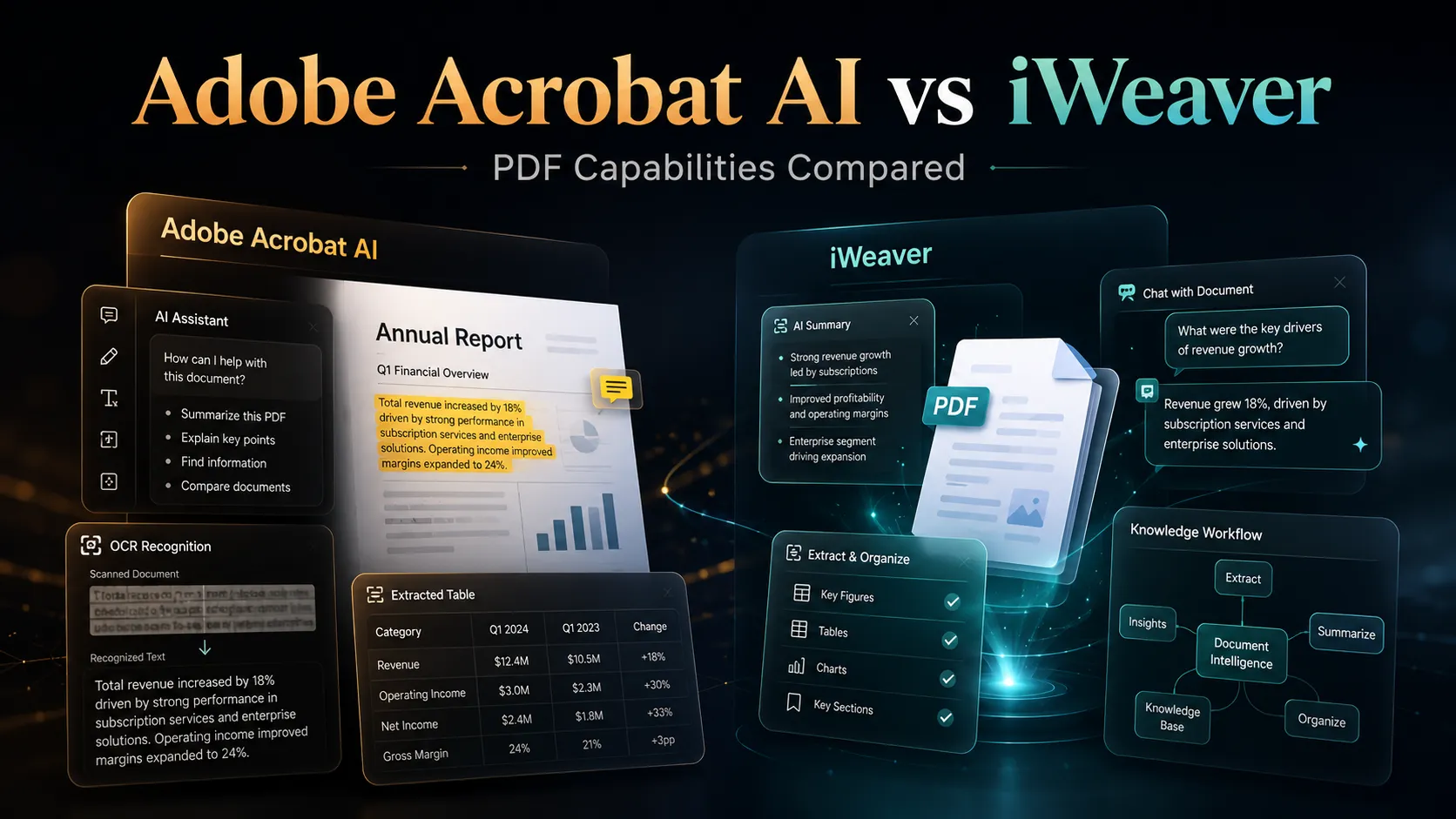
Adobe Acrobat AI Assistant et iWeaver aident tous deux les utilisateurs à comprendre plus rapidement les documents. La différence réside dans le point de départ de chaque produit.
L'Assistant IA d'Adobe Acrobat est conçu pour traiter les PDF. Intégré à l'écosystème Acrobat, il est particulièrement utile pour résumer des PDF, poser des questions, vérifier les citations et travailler dans une interface PDF familière. iWeaver, quant à lui, est axé sur le traitement des connaissances. Il prend en charge le traitement des PDF, mais aussi celui des pages web, des vidéos, des transcriptions, des notes, des images et d'autres formats, puis aide les utilisateurs à les transformer en documents structurés et en connaissances réutilisables.
Si votre travail se déroule principalement dans des fichiers PDF et Acrobat, Adobe Acrobat AI Assistant est un excellent choix. Si votre travail inclut des PDF et d'autres types de sources, et que vous avez besoin d'un flux de travail allant de la saisie à la synthèse, aux notes, aux cartes mentales, aux rapports ou à une base de connaissances, iWeaver sera peut-être plus adapté.
Comparaison rapide
| Dimension | Assistant IA d'Adobe Acrobat | iWeaver |
|---|---|---|
| Idéal pour | Résumé natif PDF, questions-réponses, citations, flux de travail Acrobat | Flux de travail de connaissances multiformats, résumés, notes, cartes mentales, rapports |
| Environnement de base | Adobe Acrobat, Reader, web, mobile, extensions de navigateur, Acrobat Studio | Espace de travail et outils d'agent iWeaver AI |
| Force PDF | Très robuste ; conçu par la société à l'origine d'Acrobat | Traitement PDF performant et flux de travail documentaire étendus |
| Au-delà du PDF | Prend en charge plusieurs documents et les fichiers non PDF dans les expériences d'IA plus récentes | Conçu dès le départ autour de multiples formats de contenu |
| Base de connaissances | PDF Spaces dans Acrobat Studio prend en charge les collections et les agents IA | La base de connaissances personnelles est au cœur du positionnement d'iWeaver |
| Utilisateur idéal | Utilisateurs d'Acrobat, équipes travaillant beaucoup avec des fichiers PDF, réviseurs de documents juridiques/commerciaux | Chercheurs, analystes, étudiants, consultants et équipes aux contributions de formats variés |
Là où Adobe Acrobat AI Assistant a l'avantage
L'atout d'Adobe réside dans son expertise du format PDF et l'intégration de son écosystème. Acrobat est un outil standard pour lire, modifier, signer et gérer les PDF. L'ajout de l'Assistant IA à cet environnement permet aux utilisateurs de bénéficier d'une assistance IA sans quitter leur flux de travail documentaire habituel.
Les pages officielles d'Adobe décrivent des fonctionnalités telles que les résumés en un clic, les questions-réponses sur les documents, les réponses rapides, l'attribution des sources, le chat vocal sur mobile et la possibilité de poser des questions sur plusieurs documents, y compris des fichiers autres que le PDF. Adobe Experience League met également l'accent sur les résumés, l'extraction d'informations et l'attribution des sources.
Avec Acrobat Studio et PDF Spaces, Adobe va au-delà de la simple collaboration sur un seul document pour proposer des espaces de travail basés sur l'IA, permettant aux utilisateurs de gérer des collections de PDF, de pages web et d'autres fichiers. Adobe devient ainsi plus performant pour les équipes souhaitant intégrer l'IA à leurs flux de travail Acrobat et Adobe existants.
Choisissez Adobe Acrobat AI Assistant si vous le souhaitez :
- Intelligence artificielle intégrée directement dans Acrobat.
- Résumé PDF et questions-réponses avec attribution des sources.
- Un environnement familier de lecture et d'édition de fichiers PDF.
- Forte compatibilité avec les flux de travail documentaires Adobe existants.
- Assistance IA pour les contrats, les rapports, les politiques et les documents numérisés dans Acrobat.
Là où iWeaver a l'avantage
L'atout d'iWeaver réside dans la diversité des flux de travail qu'il offre. Son utilisation ne se limite pas au format PDF. Les PDF constituent certes une source importante, mais les pages web, les vidéos YouTube, les transcriptions, les documents de réunion, les notes, les images et autres documents le sont tout autant.
La documentation officielle d'iWeaver met l'accent sur la saisie multiformat, les connaissances personnelles, les agents d'IA, les notes structurées, les résumés, les plans, les cartes mentales et les rapports. Cela le rend utile lorsque le traitement de PDF ne constitue qu'une étape d'un processus de recherche ou de gestion des connaissances plus vaste.
Choisissez iWeaver si vous le souhaitez :
- Un flux de travail qui combine des fichiers PDF avec des pages web, des vidéos, des notes et d'autres contenus.
- Des résultats structurés au-delà des résumés PDF.
- Une base de connaissances personnelle pour une réutilisation future.
- Cartes mentales, notes, plans, rapports et autres éléments de flux de travail.
- Un espace de travail plus flexible pour la recherche, les études, le conseil, l'analyse de marché et la production de contenu.
Traitement PDF : la force native d’Acrobat
L'Assistant IA d'Adobe Acrobat est particulièrement performant lorsque l'utilisateur souhaite rester au plus près du document source. Pour les équipes juridiques, financières, RH, éducatives et opérationnelles, les citations et la vérification des sources sont essentielles. La documentation officielle d'Adobe insiste régulièrement sur l'attribution et la possibilité de revenir rapidement au contenu source.
Ceci est important pour les projets utilisant fréquemment des fichiers PDF, car les utilisateurs doivent souvent vérifier les réponses, contrôler le langage contractuel, comparer des sections et éviter de se fier à des résultats d'IA non pris en charge. L'environnement PDF natif d'Acrobat constitue ici un atout précieux.
Flux de travail multiformat : la force accrue d’iWeaver
De nombreux processus métier réels ne se limitent pas aux fichiers PDF. Un projet d'étude de marché peut inclure des rapports annuels, des pages web de concurrents, des interviews YouTube, des transcriptions d'appels, des captures d'écran, des feuilles de calcul et des comptes rendus de réunions. Un étudiant peut avoir des enregistrements de cours, des diapositives, des travaux et des articles web. Un consultant peut avoir des fichiers PDF, des notes clients, des liens vers des études et des notes internes.
iWeaver est plus performant pour les flux de travail utilisant des sources mixtes. Son positionnement ne se limite pas à « discuter avec un PDF » ; il vise à « transformer des informations éparses en connaissances structurées ». Cette différence est cruciale lorsque le livrable final est un rapport, une note stratégique, un guide d’étude, une cartographie des connaissances ou une base de connaissances réutilisable.
Capacité d'IA documentaire
Adobe Acrobat AI Assistant est une intelligence artificielle intégrée à un logiciel de traitement de texte éprouvé. Elle est particulièrement adaptée lorsque le document lui-même demeure l'espace de travail principal.
iWeaver est une intelligence artificielle documentaire intégrée à un flux de travail de gestion des connaissances. Elle est particulièrement adaptée lorsque le document n'est qu'un point de départ et que l'utilisateur doit ensuite créer un élément à partir de celui-ci.
La comparaison porte donc moins sur « quelle IA est la plus intelligente » et plus sur « quel flux de travail correspond à votre travail ».
Scénario pratique : Examen juridique et contractuel
Une équipe juridique chargée d'examiner un contrat long peut privilégier Adobe Acrobat AI Assistant car il permet de travailler directement dans Acrobat, offre un système de questions-réponses sur les documents et met l'accent sur la citation des sources. Pour comprendre et vérifier un PDF spécifique, Adobe est la solution idéale.
Une équipe juridique ou commerciale qui compare des politiques, des comptes rendus de réunion, des directives externes, des fichiers PDF et des documents internes peut tirer profit d'iWeaver. Dans ce cas, l'objectif n'est pas seulement de lire un seul PDF, mais de synthétiser les connaissances issues de nombreuses sources et d'organiser les informations qui en résultent.
Scénario pratique : Recherche et analyse de marché
Un analyste financier qui lit un rapport annuel peut utiliser Acrobat AI Assistant pour résumer le document et poser des questions avec des citations.
Un même analyste peut utiliser iWeaver pour analyser plusieurs rapports annuels, présentations aux investisseurs, articles web, vidéos d'interviews et notes. iWeaver est plus adapté lorsque le résultat souhaité est une synthèse multi-sources, une carte mentale ou une entrée de base de connaissances.
Lequel choisir ?
Choisissez Adobe Acrobat AI Assistant si votre travail repose principalement sur les PDF et que vous utilisez déjà Acrobat. Il est particulièrement performant pour lire, résumer, interroger et vérifier les informations contenues dans les PDF et les flux de travail documentaires gérés par Acrobat.
Choisissez iWeaver si votre travail est axé sur la gestion des connaissances. Il est particulièrement adapté lorsque les fichiers PDF ne représentent qu'un type d'entrée parmi d'autres et que vous devez passer de documents sources à des notes structurées, des résumés, des rapports, des cartes mentales et des connaissances réutilisables.
L'Assistant IA d'Adobe Acrobat est un puissant assistant PDF. iWeaver est une plateforme de gestion des flux de travail basée sur l'IA plus complète. Pour les tâches exclusivement PDF, Adobe offre un avantage natif. Pour la recherche multiformat et la finalisation des flux de travail, iWeaver est plus adapté.
FAQ
iWeaver est-il une alternative à Adobe Acrobat AI ?
Oui, pour les utilisateurs qui souhaitent un traitement de documents par IA allant au-delà des seuls flux de travail PDF. iWeaver peut résumer et organiser le contenu des documents, mais sa principale différence réside dans sa capacité à gérer un plus grand nombre de formats d'entrée, de sorties de flux de travail et d'organisations de bases de connaissances.
L'Assistant IA d'Adobe Acrobat est-il meilleur pour les PDF ?
L'Assistant IA d'Adobe Acrobat est un excellent choix pour les travaux natifs au format PDF, car il est intégré à Acrobat et met l'accent sur les résumés, les questions-réponses et la citation des sources. Il est particulièrement utile pour les utilisateurs qui travaillent déjà avec Acrobat.
Qu'est-ce qu'iWeaver fait de mieux ?
iWeaver est plus adapté aux flux de travail combinant PDF, pages web, vidéos, notes, transcriptions et autres documents. Il permet également de transformer l'information en résultats structurés tels que des notes, des plans, des cartes mentales, des rapports et des connaissances réutilisables.
Quel outil est le meilleur pour la recherche ?
Pour un seul PDF, Adobe Acrobat AI Assistant peut s'avérer plus pratique. Pour la recherche multi-sources, iWeaver est souvent plus adapté car il prend en charge un flux de travail plus complet pour la collecte, la structuration et la réutilisation des connaissances.
Pack SEO
- Balise de titre : Adobe Acrobat AI vs iWeaver : Quel est le meilleur flux de travail PDF IA ?
- Méta-description : Comparez Adobe Acrobat AI Assistant et iWeaver pour la synthèse de PDF, les questions-réponses sur les documents, les flux de travail multiformats et l’organisation des bases de connaissances.
- Slug : /blog/adobe-acrobat-ai-vs-iweaver/
- Schéma suggéré : Article, FAQ, tableau comparatif
- Idées de liens internes : Résumé de PDF longs, Résumé OCR de PDF, Conversion de PDF en notes, Générateur de rapports IA, Visualisation de graphes de connaissances, Générateur de notes IA
- Appel à contributions : Essayez iWeaver pour transformer vos PDF, liens, vidéos et notes en résumés structurés, rapports, cartes mentales et connaissances réutilisables.