Nano Banana Pro wurde mit großem Tamtam gestartet – und das aus gutem Grund. Während die meisten Online-Beiträge lediglich den grundlegenden Workflow „Hochladen → Generieren“ beschreiben, geht dieser Leitfaden tiefer ins Detail. Wir erklären Ihnen, was die Pro-Version wirklich Neues bietet, wie sie Ihre Bildbearbeitung verändert und welche Techniken die besten Ergebnisse liefern. Wenn Sie einen klaren, praktischen und umfassenden Überblick wünschen, Nano Banana Pro — nicht nur oberflächliche Tipps — dies ist der Leitfaden, der für Sie entwickelt wurde.
Was ist neu bei Nano Banana Pro?
Ich kann Folgendes sagen: Es ist nicht einfach nur „Nano Banana, nur besser“ – es fühlt sich an, als würde man von einer mobilen Kamera-App zu einem kompletten Studio-Setup wechseln.
Folgendes stach besonders hervor:
- Geschärfte, detailgetreue Bilder — sauberere Kanten, natürliche Hauttöne und realistische Beleuchtung direkt aus dem ersten 4K-Rendering.
- Genaue Textwiedergabe — Schilder, Speisekarten und Verpackungen zeigen endlich lesbare und korrekt geschriebene Texte.
- Intelligenteres Weltwissen — Dank der Suchgrundlagen werden echte Fakten und Referenzen abgerufen, wenn Ihre Suchanfrage diese erfordert.
- Echte kreative Kontrolle — Sie können jetzt Beleuchtung, Objektive, Farbkorrektur und Fokus so einstellen, als würden Sie ein echtes Fotoshooting leiten.
- Beeindruckende Lokalisierung — Der übersetzte Text bleibt perfekt an das ursprüngliche Layout und Design angepasst.
- Konsistenz bei mehreren Eingängen — bis zu fünf Gesichter, Produkte oder Winkel bleiben über alle Variationen hinweg stabil.
Nano Banana Pro ist nicht nur für Künstler gedacht – es wurde für Marketingfachleute, Designer, Entwickler und alle entwickelt, die schnelle, zuverlässige und qualitativ hochwertige Grafiken benötigen.
Wer sollte Nano Banana Pro verwenden?
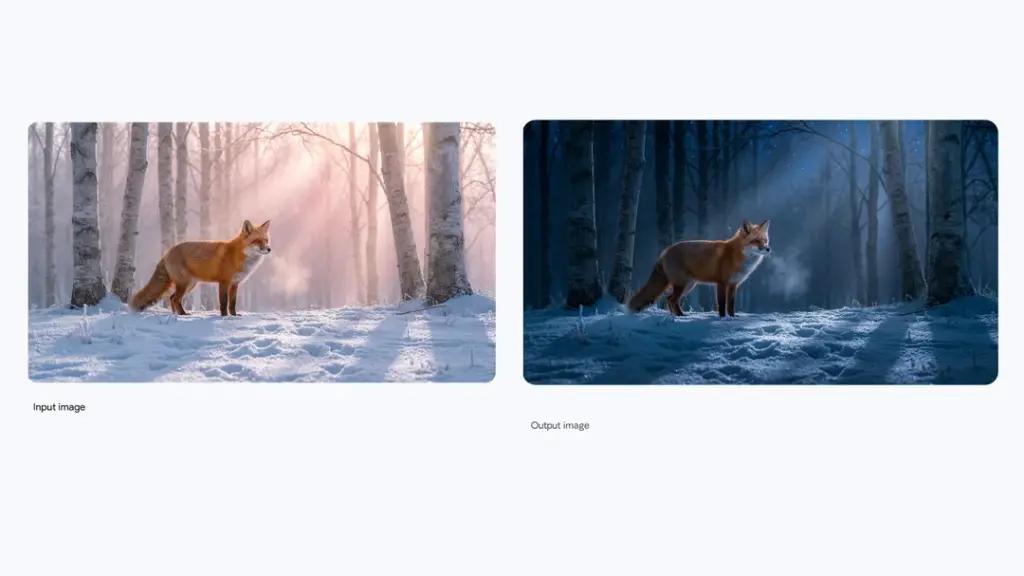
Nano Banana Pro ist nicht für den gelegentlichen Gebrauch gedacht – wenn Sie nur Memes erstellen oder einfache Bearbeitungen vornehmen, reicht die kostenlose Version aus.
Wenn visuelle Inhalte jedoch Teil Ihres Arbeitsablaufs sind und Sie sie benötigen Genauigkeit, Geschwindigkeit und gleichbleibende LeistungDann ist die Pro-Version genau die richtige für Sie.
Es ist ideal für alle, die professionelle Grafiken benötigen: Marketingfachleute, Designer, UI/UX-Teams, Online-Händler, Content-Ersteller, Dozenten und Forscher. Anstelle separater Tools oder komplexer Workflows liefert Pro schnelle, zuverlässige und produktionsfertige Ergebnisse.
Kurz gesagt: Wenn visuelle Elemente für Ihr Unternehmen wichtig sind, spart Ihnen Nano Banana Pro Zeit und Geld. Wenn es Ihnen nur um den Spaß geht, reicht die kostenlose Version völlig aus.
So nutzen Sie Nano Banana Pro wie ein Profi
Der Einstieg in Nano Banana Pro ist einfach – der Workflow ist simpel: Bild hochladen, eine Eingabeaufforderung verfassen und auf „Generieren“ klicken. Aber um wirklich loszulegen… Holen Sie das Beste aus Nano Banana Pro heraus.Sie müssen sich auf einige wenige Schlüsseltechniken konzentrieren, die Ihre Arbeit von anderen abheben werden.
Tipps zum Verfassen effektiver Schreibaufgaben
Die richtige Formulierung der Aufgabenstellung ist der Schlüssel zum Erfolg. Hier sind ein paar Tipps, mit denen Sie Ihre Ergebnisse verbessern können:
- Seien Sie konkretJe detaillierter die Angaben, desto besser das Ergebnis. Anstatt „ein Bild einer Person erstellen“ zu schreiben, versuchen Sie es beispielsweise mit „ein professionelles LinkedIn-Profilbild mit unscharfem Bürohintergrund erstellen“.
- Die Umwelt einbeziehenKonzentriere dich nicht nur auf das Thema – gib dem Werkzeug einen Kontext. „Eine futuristische Stadt in der Abenddämmerung, in der Neonlichter sich in den gläsernen Wolkenkratzern spiegeln.“
- Nutze die Macht der BeschreibungenBeschreiben Sie Licht, Stimmung und Stil. „Warmes Sonnenlicht, weiche Schatten, filmischer Look, 16:9-Bildformat.“
- Eingabeaufforderungen mit mehreren OptionenWenn Sie mehrere Bilder kombinieren, erklären Sie unbedingt, welchen Beitrag jedes Bild leistet. Zum Beispiel: „Verwenden Sie Bild A für die Pose der Figur, Bild B für den Hintergrund und Bild C für die Beleuchtung.“
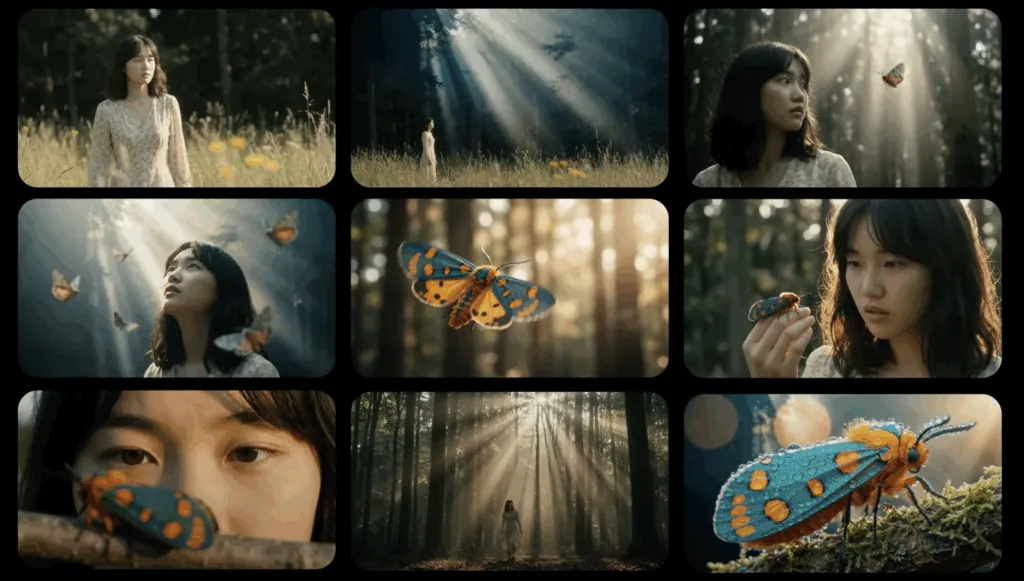
Sie werden feststellen, dass Nano Banana Pro, sobald Sie den Dreh raus haben, immer mehr wie eine Erweiterung Ihres kreativen Prozesses funktioniert.
Fortgeschrittene Tricks zum Ausprobieren
Sobald Sie die Grundlagen beherrschen, versuchen Sie diese Tricks, um das Modell noch weiter zu optimieren:
- Skalierung durch Aufforderungen: Fügen Sie Ihrer Eingabeaufforderung „hohe Auflösung“ oder „detailliert“ hinzu, um schärfere und präzisere Ergebnisse zu erzielen.
- Chargenvariationen: Generieren Sie mehrere Versionen derselben Eingabeaufforderung, um zu sehen, welche am besten aussieht.
- Mehrere Eingaben verwendenWenn Sie mehrere Elemente in Ihrem Bild benötigen, ist jetzt der ideale Zeitpunkt, die Funktion für mehrere Eingabefelder zu verwenden. Sie können beispielsweise zwei verschiedene Produkte miteinander kombinieren, um das perfekte Mockup für eine Anzeige zu erstellen.
Die Grenzen von Nano Banana Pro (und wie man sie umgehen kann)
Kein Werkzeug ist perfekt – und auch Nano Banana Pro, so leistungsstark es auch ist, hat einige Einschränkungen. Aber keine Sorge, es gibt Möglichkeiten, diese zu umgehen, um dennoch erstklassige Ergebnisse zu erzielen.
Folgendes sollten Sie beachten:
| Einschränkung | Workaround |
| Feine Detailwiedergabe | Bei sehr kleinem Text oder komplexen Details sollte das Bild auf 4K hochskaliert oder spezielle Anweisungen wie „hohe Detailgenauigkeit“ verwendet werden. |
| Datengenauigkeit für komplexe Diagramme | Überprüfen Sie Fakten immer sorgfältig, insbesondere bei der Erstellung wissenschaftlicher oder historischer Darstellungen. |
| Übersetzung und kulturelle Sensibilität | Übersetzungen sollten manuell überprüft werden, um ungeschickte Formulierungen oder kulturelle Fehltritte zu vermeiden. |
| Beleuchtung und Farbmischung | Bei komplexen Lichtveränderungen empfiehlt es sich, in kleineren Schritten vorzugehen und übermäßige Bearbeitung zu vermeiden. |
Diese Einschränkungen bestehen zwar, sind aber mit der richtigen Herangehensweise beherrschbar und können durch ein wenig Liebe zum Detail leicht behoben werden.
Nano Banana 2: Was ist neu in der neuesten Version?
Nano Banana 2 ist die neueste Weiterentwicklung der KI-Bildgenerierungstechnologie von Google und wurde entwickelt, um eine schnellere Generierungsgeschwindigkeit und konsistentere visuelle Ergebnisse als frühere Versionen zu liefern.
Nano Banana 2 basiert auf der Gemini Flash Image-Architektur und bietet zahlreiche Verbesserungen, die ihn besser für reale Produktionsabläufe geeignet machen – darunter Marketingdesign, Produktvisualisierungen und die Erstellung von Social-Media-Inhalten.
Zu den wichtigsten Verbesserungen gehören:
- Schnellere Bildgenerierung mit Blitzgeschwindigkeit
- Ausgabe mit bis zu 4K-Auflösung für professionelle Bildqualität
- Unterstützung für mehrere Bildreferenzen für eine kontrolliertere Erzeugung
- Verbesserte Textdarstellung in Bildern
- Besseres Verständnis von Anweisungen und deren Befolgung
Eine weitere bemerkenswerte Verbesserung ist die Fähigkeit, die Wartung Charakter- und Stilkonsistenz über mehrere Bilder hinwegDadurch wird es einfacher, Storyboards, Markencharaktere und serielle visuelle Inhalte zu erstellen.
Für Kreative, die zuvor Nano Banana Pro verwendet haben, stellt Nano Banana 2 eine Veränderung hin zu schnellere Iteration und skalierbare Bildproduktion, wobei viele der in früheren Versionen eingeführten Verbesserungen der visuellen Qualität erhalten blieben.
Wenn Sie wissen möchten, wie die vorherige Generation funktioniert und wie sie sich im Vergleich dazu schlägt, können Sie hier unsere ausführliche Anleitung lesen:
👉 Nano Banana Pro erklärt: Nano Banana 2: Ein ausgewogener Ansatz für Geschwindigkeit und Bildqualität
Nano Banana vs Nano Banana 2 vs Nano Banana Pro
Da mittlerweile mehrere Versionen von Nano Banana online im Umlauf sind, sind viele Nutzer über die Unterschiede zwischen den verschiedenen Versionen verwirrt. Nano Banana, Nano Banana 2 und Nano Banana ProObwohl sie alle zur selben Familie von KI-Bildgenerierungsmodellen gehören, konzentriert sich jede Version auf etwas andere Prioritäten wie Geschwindigkeit, Qualität oder Workflow-Flexibilität.
Hier ein kurzer Vergleich:
| Version | Schwerpunkt | Am besten für | Schlüsselstärke |
|---|---|---|---|
| Nano-Banane | Basisbildmodell | Gelegenheitsnutzer, einfache Eingabeaufforderungen | Leicht und einfach zu bedienen |
| Nano Banana 2 | Schnellere Generierung & Arbeitsabläufe | Content-Ersteller und Vermarkter | Höhere Geschwindigkeit und verbessertes, schnelleres Verständnis |
| Nano Banana Pro | Hochwertige Bildwiedergabe | Designer und professionelle Kreative | Höhere visuelle Wiedergabetreue und Detailgenauigkeit |
Nano-Banane
Nano Banana ist das ursprüngliche, ressourcenschonende Bildgenerierungsmodell, das für die schnelle Erstellung von Bildern entwickelt wurde. Es legt Wert auf Einfachheit und Zugänglichkeit und ermöglicht es Benutzern, ohne komplexe Einstellungen visuelle Darstellungen aus Texteingaben zu generieren.
Im Vergleich zu neueren Versionen liefert es jedoch möglicherweise weniger konsistente Ergebnisse und bietet weniger erweiterte Steuerungsmöglichkeiten.
Nano Banana 2
Nano Banana 2 führt signifikante Verbesserungen ein in Generierungsgeschwindigkeit und prompte GenauigkeitEs ist für schnelle Iterationen optimiert und eignet sich daher besonders für Arbeitsabläufe, die die schnelle Generierung vieler Bilder erfordern – wie beispielsweise Grafiken für soziale Medien, Marketinggrafiken und Konzeptzeichnungen.
Das Modell kommt auch mit komplexeren Eingabeaufforderungen und Verweisen auf mehrere Bilder besser zurecht als die Originalversion.
Nano Banana Pro
Nano Banana Pro konzentriert sich mehr auf Bildqualität und professionelle AusgabeEs wurde entwickelt, um detailliertere Grafiken, eine bessere Beleuchtung und einen stärkeren Fotorealismus zu erzeugen.
Das macht es beliebt bei Designern, Kreativprofis und Nutzern, die hochwertige Endergebnisse anstelle von schnellen Entwürfen wünschen.
Einfach ausgedrückt:
- Nano Banana = einfacher Bildgenerator
- Nano Banana 2 = schnellere und intelligentere Generation
- Nano Banana Pro = höchste visuelle Qualität
Häufig gestellte Fragen
1. Was ist Nano Banana AI?
Nano Banana ist ein KI-gestütztes Bildgenerierungsmodell, das aus Texteingaben visuelle Darstellungen erstellt. Es konzentriert sich auf die schnelle Bildgenerierung und einfache, auf Eingabeaufforderungen basierende Arbeitsabläufe und eignet sich daher für Kreative, Marketingfachleute und Gelegenheitsnutzer, die schnell Bilder generieren möchten.
Neuere Versionen wie z. B. Nano Banana 2 Und Nano Banana Pro haben Verbesserungen bei der Generierungsgeschwindigkeit, der schnellen Bildverarbeitung und der Bildqualität eingeführt.
2. Ist Nano Banana 2 besser als Nano Banana Pro?
Nano Banana 2 und Nano Banana Pro dienen leicht unterschiedlichen Zwecken.
- Nano Banana 2 Der Fokus liegt auf schnellerer Generierungsgeschwindigkeit und besserer, prompter Interpretation, wodurch es sich ideal für die schnelle Erstellung von Inhalten und Experimente eignet.
- Nano Banana Pro Priorisiert eine höhere visuelle Wiedergabetreue und detailliertere Darstellung, was für professionelle Designarbeiten besser geeignet ist.
Viele Kreative nutzen Nano Banana 2, um schnell Ideen zu generieren und wechseln dann zu Pro-Modellen für präzisere Ergebnisse.
3. Wie verwende ich Nano Banana AI?
Die Verwendung von Nano Banana besteht typischerweise darin, eine Textbeschreibung des gewünschten Bildes einzugeben. Die KI generiert dann auf Grundlage dieser Beschreibung Visualisierungen.
In den meisten Fällen sieht der Prozess folgendermaßen aus:
- Verfassen Sie eine beschreibende Textaufgabe
- Wählen Sie einen Stil oder ein Referenzbild (optional).
- Bild generieren und verfeinern
Die Qualität der Ergebnisse hängt oft davon ab, wie detailliert und klar Ihre Aufgabenstellung ist.
4. Ist Nano Banana kostenlos?
Der Zugriff auf Nano Banana hängt von der Plattform ab, die das Modell bereitstellt. Einige Tools bieten kostenlose Testversionen oder eine begrenzte Anzahl kostenloser Generierungen an, während andere ein Abonnement für erweiterte Funktionen wie höher auflösende Bilder oder eine höhere Generierungsgeschwindigkeit erfordern.
5. Kann ich mit Nano Banana erstellte Bilder, PDFs oder Videos zusammenfassen?
Ja. Viele Kreative erstellen visuelle Inhalte mit KI-Tools wie Nano Banana und verwenden dann Tools wie … iWeaver Zugehörige Dokumente und Medien analysieren, zusammenfassen oder organisieren.
Zum Beispiel kann Ihnen iWeaver helfen:
- PDFs oder Forschungsdokumente zusammenfassen
- Erkenntnisse aus Videos gewinnen
- Informationen in strukturierte Notizen oder Mindmaps umwandeln
Dadurch wird die Verwaltung von KI-generierten Inhalten in Forschungs-, Marketing- oder Content-Erstellungsprozessen erleichtert.
Nano Banana Pro zeichnet sich aus durch seine Geschwindigkeit, Benutzerfreundlichkeit und gleichbleibende Leistung Es ist schneller und zuverlässiger für die meisten Nutzer als die anderen. Außerdem wurde es für professionelle Anwender entwickelt, die Folgendes benötigen: Präzision und KontrolleDas macht es zur ersten Wahl für Marketingfachleute, Designer und Produktteams.