AI をしばらく使用している場合は、おそらく同じ摩擦点に遭遇したことがあるでしょう。つまり、毎回同じ要件を繰り返したり、指示をコピーして新しいチャットに貼り付けたり、タスクが複雑になるとすぐに出力に一貫性がなくなったりします。
クロード・スキルズは「AIをより賢くする」ことに焦点を当てているのではなく、 信頼できる作業方法を捉える 必要に応じて再利用して起動できます。Anthropicはこのメカニズムを次のように呼んでいます。 エージェント スキルコンテキストオーバーヘッドを削減するように設計されています オンデマンド読み込み.
スキルとは何ですか?
エージェント スキルは、移植可能な「能力パッケージ」形式です。 実際には、スキルは次のものを含むフォルダーです。
- タスクの指示
- スキルを発動するタイミング
- ステップバイステップの実行ガイダンス
- オプションのスクリプト、テンプレート、参考資料
クロード(およびエージェントスキルをサポートする他のツール)は タスクに関連する場合にのみスキルを読み込んで実行する.
スキルの3つの中核特性
- 再利用可能 繰り返し可能なワークフローをスキルに変換し、セッション間で再利用できます。
- オンデマンド読み込み 起動時にシステムはスキルの 名前 + 説明トリガーされたときにのみ完全な指示が読み込まれ、必要な場合にのみアセットまたは参照が取り込まれます。
- ポータブル スキルは通常、キーファイルが保存されているディレクトリです。
スキル.md(YAMLメタデータ付き)。互換性のあるツール間でコピーできます。
スキルはどのように進化したか?
スキルの前に、MCP についてわかりやすく説明したいと思います。
MCP(モデルコンテキストプロトコル) エージェントを支援することが主な目的です 外部ツールやシステムに接続する実際の使用では、多くのサーバーやツールを接続すると、 ツール定義とツール結果は大量のトークンを消費する可能性があるこれにより、エージェントの効率が低下する可能性があります。Anthropicは、接続されたサーバーの数が多すぎる場合に発生するトークンオーバーヘッドの問題を指摘しています。
しかし、ほとんどのチームが実際に必要としているのは「ツールへのアクセス」だけではなく、 標準化された実行一貫したフォーマット、固定された手順、明確なレビューチェックポイント。MCPはデータやツールに接続できますが、社内のSOPや出力基準を自動的に適用するものではありません。
それがスキルが埋めるギャップです。SOP、方法論、出力ルールをエンコードして、 スキル.md、そして頼りに 段階的な開示 コンテキストコストを低く抑えるため。
簡単に説明すると、MCP はエージェントがツールを使用できるようにします。スキルは、エージェントに私の基準に従ってツールを使用する方法を教えます。
スキルの仕組み:段階的な開示
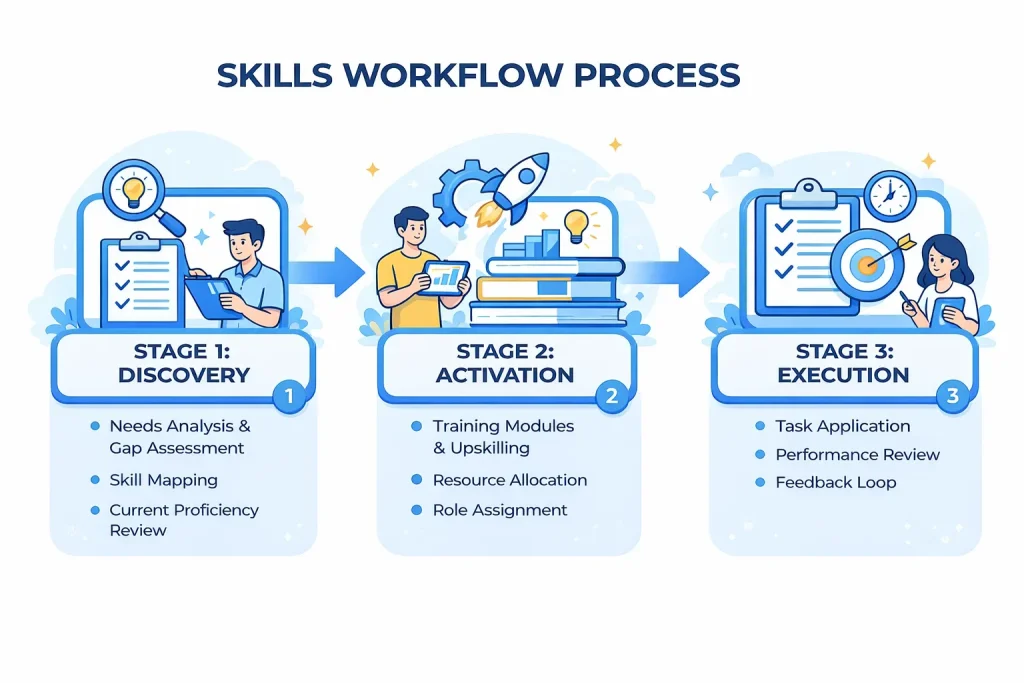
エージェント スキル仕様では、読み込みを 3 つのレイヤーに分割します。
- レイヤー1: メタデータ(起動時に読み込まれる) のみ
名前そして説明がロードされます (スキルごとに約 100 トークン)。 - レイヤー2: 指示(トリガー時にロード) 完全な
スキル.mdスキルが関連するときに指示が読み込まれます (ガイダンスではこれを約 5,000 トークン未満に保つことを推奨しています)。 - レイヤー3: リソース(必要に応じてロード) 次のようなディレクトリ
スクリプト/,参考文献/、 そして資産/必要な場合にのみロードされます。実際には、このレイヤーは命令トークンの予算によって制約されません。
これが、コンテキスト ウィンドウを膨らませることなく、多くのスキルを利用できるようにできる理由です。無関係なスキルは、必要になるまで会話に含まれません。
スキル vs MCP vs ClawdBot: 違いと組み合わせ方
ClawdBotは最近人気が出てきており、 スキルを中心に構築されたアプリケーション層. 機能拡張は、 エージェント スキル互換スキルディレクトリ環境、構成、バイナリ依存関係に基づいて、使用可能なスキルをフィルタリングできます。つまり、スキルを実際の運用ワークフローに組み込むのに役立ちます。
以下は、スキル、MCP、ClawdBot の違いと接続を明確に示す比較です。
| カテゴリ | スキル(エージェントスキル) | MCP(モデルコンテキストプロトコル) | クローボット |
| 主な目的 | ワークフローと出力を標準化する | エージェントを外部ツール/システムに接続する | スキルを使用して長期エージェントワークフローを実行する |
| それが提供するもの | SOP、ステップ、出力ルール、再利用可能なタスクロジック | ツールアクセス、外部アクション、データ取得 | 実際にスキルをロードして実行するランタイムレイヤー |
| キーユニット | SKILL.md + オプションのアセット/スクリプト/リファレンス | MCP サーバー + ツール スキーマ + ツール呼び出し | ワークスペース + スキル読み込みルール + チャネル統合 |
| 最適な用途 | 明確な基準を持つ繰り返し可能なタスク | ツールの統合とシステムの接続 | 常時自動化と実際のワークフロー |
| 典型的な関係 | 仕事の進め方をガイドする | ツールとデータへのアクセスを可能にする | スキルを使用します(MCP と一緒に作業することもできます) |
スキルの使い方(初心者から上級者まで)
Claude Web/デスクトップのスキルを使用する(非技術系ユーザーに最適)
- へ移動 設定 > 機能
- 有効にする コード実行とファイル作成
- の中で スキル セクションで、例のスキルを有効にするか、クリックします アップロードスキル 独自のスキルZIPをアップロードする
- タスクを自然言語で説明してください。公式スキルの多くは手動で選択する必要はありません。Claude が必要に応じて自動的に有効化します。
スキルの書き方がわからない場合は、ワークフローの要件をクロード(または アイウィーバー) 最初にスキルの構造とコンテンツを生成し、次にスキルをアップロードします。
Claude Code のスキルを活用する(ワークフロー強化のため)
- スキルフォルダを
~/.claude/skills/ /スキル.md個人で再利用可能なスキル - または下に置く
.claude/スキル/プロジェクト固有のスキルについてはプロジェクト内 - 次に直接起動します
/スキル名
ClawdBot でスキルを使用する (長時間実行されるエージェント向け)
- ClawdBotは次のような場所からスキルをロードします
~/.clawdbot/スキルそして/スキル明確な優先ルールを持つ - ClawdHub経由でスキルをインストールして同期することもできます(例:
clawdhub インストール) - サードパーティのスキルを使用する場合は、信頼できるコードとして扱い、シークレットの挿入とサンドボックス化の実践に注意してください。
これ 包括的なガイド 初心者向けに、ClawdBot を設定して正常に起動する方法を段階的に説明します。
スキルが最良の選択となるとき
私の経験では、スキルはタスクが 繰り返し可能、 もっている 固定出力基準、手順を明確に記述できます。典型的な例としては、以下のようなものがあります。
- 週次レポートと構造化されたライティングテンプレート
- 製品の発売と競合分析フレームワーク
- 履歴書/JDの調整やスクリーニングチェックリストなどの採用ワークフロー
- 会議メモの構造化とアクション項目の抽出
- 定期的なデータのクリーンアップとレポート
- コンテンツ配信のための公開前チェックリスト
手順、必要な入力、出力形式をスキルに組み込めば、セッション間で再利用できます。スキルはオンデマンドで読み込まれるため、コンテキストウィンドウを使い果たすことなく複雑なタスクを安定して実行できます。
主な課題は通常、インストールではなく、 明確なスキルクエリを書くクエリは、適切なスキルがトリガーされるかどうか、そしてスキルが適切に実行されるために十分な入力を受け取ったかどうかを判断します。この摩擦を軽減するために、私は iWeaverプロンプトの最適化 大まかなリクエストをより明確で構造化されたクエリに書き直し、そのクエリをスキルに渡して実行してもらいます。