
抽象的な: 潜在能力を最大限に引き出す ナノバナナプロ 20のクリエイティブな使用例。画像生成の効率を高める アイウィーバー、Nano Banana Pro と専門家のヒントをまとめた総合ガイドをご覧ください。
の展開により ジェミニ3プロGoogleは生成AIにおけるもう一つの大きなマイルストーンを発表しました。 ナノバナナプロ 画像生成モデル。ピクセル単位の単純なアセンブリに依存していた従来のツールとは異なり、Nano Banana Proは高度なビジョン機能とGemini 3 Proの強力な推論エンジンを組み合わせました。その結果、より鮮明なクリエイティブな成果物、より信頼性の高いリサーチ機能、そして画像内のテキストレンダリングの驚くほど正確な表現が実現しました。
マーケティング担当者、教育者、デザイナー、あるいは新たな可能性を模索している個人ユーザーであっても、このモデルを活用する方法を理解することで、アイデアをより早く実現し、生産性を大幅に向上させることができます。
このガイドでは Nano Banana Proの20のベストな使い方実用的なヒント、ベスト プラクティス、専門家のアドバイスなどが含まれており、教育者、専門家、デザイナー、研究者、個人ユーザーが簡単に始めることができます。
Nano Banana Proが他と違う理由
ユースケースの詳細に入る前に、このモデルがなぜ特別なのかを説明しておきましょう。単に「描く」だけでなく、「読み取る」ことと「考える」ことまでできるのです。
- テキストレンダリング: 図やインフォグラフィック上に完璧で読みやすいテキストを生成します。
- 推論: 文脈を推測できます (例: 1830 年の場所の様子を知る)。
- スタイルの一貫性「マッキンゼーのスライド」から「ピクサーの漫画」まで、複雑な芸術的スタイルを模倣しています。
ワークフローを変革するための主なユースケースをご紹介します。
Nano Banana Pro のユースケースとプロンプトのアイデア
教育と知識の可視化
1. 複雑な科学インフォグラフィック
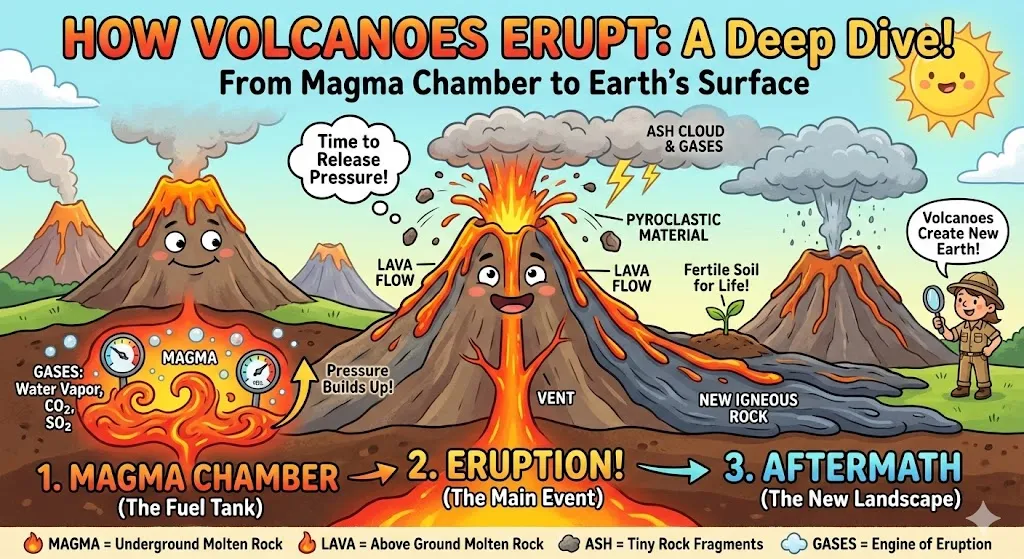
概要: 火山の噴火の仕組みといった複雑な科学的説明を、明確で構造化された視覚的なチャートに変換できます。Nano Banana Pro を使えば、複雑なテキストをラベル、ステップごとのフロー、そして分かりやすいビジュアルを備えた図表に変換できます。
アドバンテージ:コミック、イラスト、洗練された商業テーマなど、幅広いビジュアルスタイルからお選びいただけます。スライドの雰囲気に合った画像を作成できます。また、高精度なテキストレンダリング機能により、Canvaなどのツールで何時間もかけて手作業でデザインする手間も省けます。
プロンプト中学生に火山噴火の原理を説明する必要があります。できればアニメーション形式で、これを説明するインフォグラフィックを作成してください。
2. 科学的な細胞図の生成
概要: Nano Banana Proでは、手描きのスケッチ、簡略化されたPowerPoint図、または生物学研究論文の参考図をアップロードできます。必要なタンパク質名、パスウェイラベル、主要な注釈を指定すると、SCIレベルの論文に適した高品質の細胞構造図が生成されます。
アドバンテージ: この機能により、研究者が複雑な生物学的図を手作業で描く時間が大幅に短縮されます。出力は正確で、出版準備が整っており、科学的な基準に沿った視覚的な一貫性を備えているため、学術論文、助成金申請書、会議ポスター、授業資料などに最適です。
プロンプト:
アップロードした画像に基づいて、高品質な細胞構造図を作成してください。最終的な図は、SCIレベルの生物学研究論文の視覚基準に準拠する必要があります。
必ず次の点に注意してください:
- 必要なすべてのタンパク質にラベルを付けます: [例: EGFR、AKT、mTOR、ERK]
- シグナル伝達の流れを明確に示すために、経路ラベルと方向矢印を含める
- わかりやすくするために、重要な注釈をテキストボックスまたは吹き出しとして追加します。
- 異なる経路で一貫した配色を維持する
- すべてのタンパク質の位置、細胞小器官の配置、経路の方向が生物学的に正確であることを確認する
- 出版に適した、きれいで学術的なイラストスタイルを使用する(漫画風ではない)
- すべてのラベルを鮮明で読みやすく、バランスの取れたものにしてください
3. 化学プロセス図
概要: ソース テキストを提供せずに、分別蒸留などの目に見えないプロセスを視覚化します。
アドバンテージ: モデルは内部知識を使用して図を正しく構造化します。
プロンプト: 原油の正しい沸点や出力など、分留の仕組みを示すテキスト付きのインフォグラフィックを作成します。
4. 子供向けの数学の概念
概要:小学生に基本的な算数を教えるための、生き生きとした面白い漫画を作成します。
アドバンテージ: 特定の教育教授法と魅力的な視覚テーマを組み合わせます。
プロンプト: 75 を 5 で割る例を使用して、1 年生が割り算の基本的な概念を学習できるようにスライドを作成します。楽しい漫画のエジプトをテーマにします。
5. 文学的シーンの再現
概要: 本 (例: ハリー・ポッター) のページをアップロードし、説明されているシーンを視覚化するように AI に依頼します。
アドバンテージ: モデルはテキストを読み取り、コンテキスト (登場人物、設定) を理解し、忠実な表現を生成します。
プロンプト: [ページ画像をアップロード] 本書の最初のページを読んで、描かれている場面の写実的な写真を作成してください。雰囲気や登場人物の描写を正確に捉えてください。
テキストをインフォグラフィックに変換することに加え、マインドマップは知識を視覚化して整理する最も効果的な方法の 1 つです。 iWeaver マインドマップジェネレーター YouTube動画、画像、PDFなどのファイルをアップロードすると、そのコンテンツが分かりやすく構造化されたマインドマップに自動変換されます。これにより、教師の授業準備が容易になり、生徒は情報をより効率的に復習、記憶、理解できるようになります。
ビジネスとプロフェッショナルの生産性向上
6. マッキンゼー風の戦略スライド
概要: トップコンサルティングファームの実績をモデルにした、洗練されたエンタープライズグレードのプレゼンテーションスライドを作成できます。投資家向けロードショー、製品デモ、エグゼクティブブリーフィング、そして重要なビジネスプレゼンテーションに最適です。
アドバンテージ: トップコンサルティング会社のクリーンで高級感のある美観を瞬時に再現します。
プロンプトLLM の開発につながった重要な研究の進歩とそれが経済に与えた影響を説明するマッキンゼー風のスライドを作成します。
7. アウトラインからPPTへの変換
概要:コンテンツのアウトラインをアップロードまたは貼り付けるだけで、Nano Banana Pro が瞬時に完全なスライドデッキに変換します。このツールは、情報を論理的なスライドに構造化し、一貫したフォーマットを適用し、必要に応じてビジュアル要素を追加します。
メリット:プレゼンテーションを一から作成する必要はもうありません。この機能により、PPTの作成速度が大幅に向上し、プロフェッショナルなデザイン基準が維持され、チームは最小限の労力で整理されたプレゼンテーションを作成できるようになります。
プロンプトデジタルマーケティングを専攻しており、上司に業績評価を行う予定です。最近の仕事の成果に基づいて作成した概要は以下の通りです。PowerPointプレゼンテーションの作成と適切な画像の追加をお願いします。プレゼンテーションスタイルは、黒とオレンジを基調としたシンプルでビジネスライクなデザインをお願いします。
8. 企業メカニズムの説明
概要: 複雑な企業理論 (ピーターの原理など) を様式化されたアートを使用して説明します。
アドバンテージ: 退屈なビジネス理論を記憶に残り、社内研修に魅力的に伝えます。
プロンプト「セブランスTV番組のイラスト風に、大企業におけるピーターの原理の働きを示す詳細な図を作成してください。」
9. スタートアップの成長インフォグラフィック
概要: ビジネスアドバイス (Y Combinator のヒントなど) を独特の芸術的なスタイルで視覚化します。
アドバンテージ: エンゲージメントを促進するソーシャル メディア マーケティング (LinkedIn/Twitter) に最適です。
プロンプト: 「B2B SaaS スタートアップの成長アドバイスを、ソール・バスの抽象的な幾何学的スタイルで表現したインフォグラフィックを作成してください。」
10. AI履歴書生成
概要Nano Banana Proは、あなたの経歴、職歴、そしてキャリア目標に基づいて、洗練されたプロフェッショナルな履歴書を作成します。経験を入力するか、既存の書類をアップロードするだけで、ツールが情報を整理し、採用担当者が見やすいフォーマットに仕上げます。明確なセクション、一貫したスタイル、そしてオプションで視覚的な加工も行えます。
アドバンテージ: この機能により、手作業によるフォーマット作業にかかる時間を節約し、履歴書が最新の採用基準を満たすことを保証します。ATS対応で整理された履歴書は、あなたの強みを強調し、読みやすさを向上させ、競争の激しい就職市場で目立つ可能性を高めます。
プロンプト: [職歴を貼り付け] これが私の職務経歴です。プロフェッショナルで競争力のある履歴書の作成をお手伝いください。
オフィスワーカーにとって、効率的なワークフローを維持するためには、明確なステップバイステップの指示が不可欠です。上記の方法以外にも、次のような方法があります。 iWeaver フローチャートメーカー オンボーディングプロセス、作業マイルストーン、製品ロジックの視覚的なフローチャートを瞬時に生成します。これらのビジュアル化により、複雑な手順を理解しやすくなり、トレーニングとコミュニケーションにかかるコストを大幅に削減できます。
デザインと建築
11. 建築断面
概要: 有名な建造物の内部を見て、その工学技術を理解しましょう。
アドバンテージ: 複雑な空間関係と技術的なラベル付けを同時に処理します。
プロンプト: ゴールデン ゲート ブリッジの詳細な断面図。橋の建設の背後にある主要な工学原理を示しています。
12. 製品設計図の抽出
概要:Nano Banana Proを使えば、製品画像をアップロードするだけで、モデルが自動的に構造、部品、寸法を分析します。そして、製品をエンジニアリングスタイルの明確な設計図へと分解します。
メリット:この機能により、手作業によるリバースエンジニアリングや専門的なCAD図面作成が不要になります。迅速かつ正確なビジュアルドキュメントを作成できるため、製品設計者、製造業者、そして試作や競合分析に取り組むチームに最適です。
プロンプト: [画像のアップロード] この図の技術図面を作成してください。
13. 建築パースの内訳
概要: 建物の写真をアップロードすると、Nano Banana Pro は建築構造を自動分析し、明確なパース図を生成します。このモデルは、パース線、構成要素の名称、比率、寸法を画像上に直接識別し、ラベル付けします。
メリット:この機能は、手作業による製図の専門知識を必要とせず、正確で専門的な注釈付きの建築資料を提供します。数秒で正確な視覚的なドキュメントと構造分析を必要とする建築家、学生、不動産専門家、デザイナーに最適です。
プロンプト: [画像のアップロード] 画像内の建物の遠近法を分析し、遠近線を描くのにご協力ください。また、画像内の建物の各部分の専門名称を明記してください。
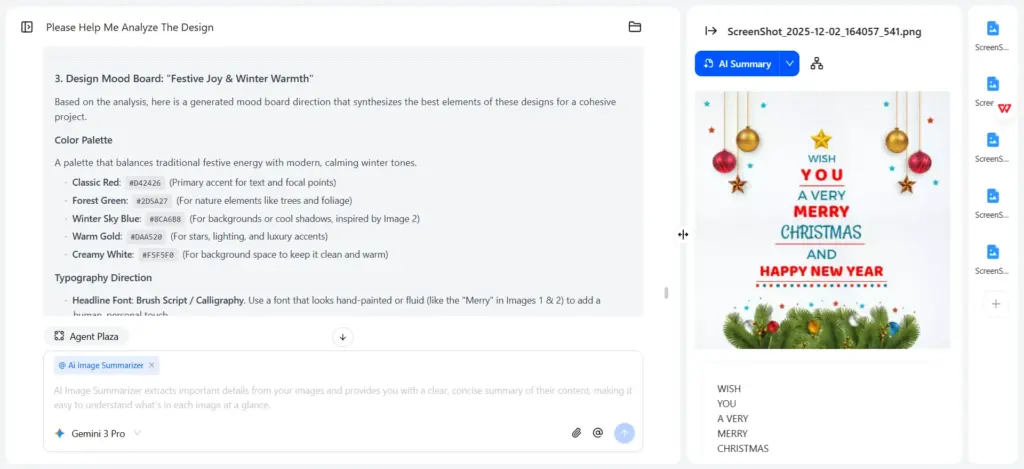
一言で言えば、Nano Banana Proがその強力な機能と実用的なユースケースを通して建築デザインをどのように強化するかを探りました。デザインワークフローにおけるもう一つの重要なステップは、ムードボードの作成です。 iWeaver 画像要約ツール複数の画像を一括アップロードすると、そのビジュアル要素の簡潔な概要を瞬時に生成できます。以下のヒントを参考に、インスピレーションの源を分析し、製品間の美的感覚を比較し、クリエイティブな方向性を洗練させましょう。
プロンプト: これらの写真のデザイン スタイル、デザイン コンセプト、色の美学を分析し、デザイン ムード ボードを作成するのを手伝ってください。
クリエイティブ&ライフスタイル
14. 様式化された地図
概要: 標準的な地図を、旅行ブログやガイドのテーマ別イラストに変換します。
アドバンテージ: 地理データを視覚的に魅力的かつテーマ別に表示します。
プロンプト: 主要な国立公園を強調表示した米国の地図を、かわいいモバイル ゲーム UI のスタイルで示します。
15. AIインテリアデザイナー
概要: お気に入りの家具の写真をアップロードすると、Nano Banana Proがあなたの好みのデザインスタイルに合った部屋のレイアウトに家具を配置します。このツールは、家具が実際の空間にどのように見えるかを視覚的に表示し、インテリアプランニングをサポートします。
アドバンテージ: 基本的な空間プランニングにプロのインテリアデザイナーに頼る必要はもうありません。Nano Banana Proは、リアルな部屋の配置を提供し、住宅のリフォーム、インテリアのアップデート、家具の購入など、より迅速な意思決定を可能にします。
プロンプト: これらの6つの家具を部屋に配置し、おすすめの装飾画、花瓶、カーテンなどの装飾品を加えてください。インテリアデザインは全体的にシンプルにまとめましょう。
16. 研究論文を1ページのレポートに
概要: 技術論文の PDF をアップロードし、視覚的な概要を依頼します。
アドバンテージ: 複雑な学術情報を素早く理解します。
プロンプト: 添付の研究論文の主な調査結果を、明確なヘッダーが付いた 1 ページの視覚的なインフォグラフィックとして要約します。
の iWeaver 研究論文要約ツールNano Banana Proの実用的な代替ツールであるiWeaverは、学術論文を明確な抽象的なアウトラインとマインドマップにまとめることができます。Nano Banana Proで生成された画像はリアルタイムで編集できませんが、iWeaverのマインドマップは完全なプレビューとオンライン編集機能を備えています。これにより、研究論文の閲覧、記録、要約のプロセスが大幅に効率化され、ユーザーフレンドリーになります。
合理化されたワークフロー
17. 一貫性のある多角度の商品セット画像
概要: ワンクリックでブランド化された製品グループ画像を生成します。Nano Banana Proは、さまざまな角度で一貫した色、形状、スタイル、テクスチャ、ロゴの配置を維持します。
アドバンテージ: これにより、高度にプロフェッショナルで統一感のある製品ビジュアルを実現できます。eコマース、カタログ、マーケティング資料、ブランドアイデンティティの構築に最適です。高額な写真撮影をすることなく、スタジオ品質の多角度からの製品画像が得られます。
プロンプト: このロゴを使用してパーカーを作成し、クローズアップ、アイソメトリック、半身、詳細の 4 つの角度からパーカーの 4 つの異なる動的ビューを生成します。
18. 画像テキスト翻訳
概要: Nano Banana Pro は、元のビジュアルレイアウト、タイポグラフィ、デザイン スタイルを維持しながら、画像内のテキストを翻訳できます。
アドバンテージ: 翻訳された画像は、歪みや位置ずれがなく、自然でブランドイメージに一貫性があります。デザイナーはレイアウトを一から作り直す必要がなくなり、多言語コンテンツの制作時間を短縮できます。
プロンプト: テキストのレイアウト、画像の内容、サイズなどを変更せずに、画像内のテキストを英語に翻訳します。
19. ステップバイステップの「ハウツー」ガイド
概要: 家具の組み立てや調理の方法を視覚的に説明した説明書。
アドバンテージ: モデルはシーケンスと論理的な進行を理解します。
プロンプト: ウィンザーノットの結び方をステップバイステップで説明した 4 パネルのビジュアル ガイドを作成します。
20. テキストの自動レイアウト
概要: テキスト自動レイアウト機能を使用すると、大量のコンテンツを貼り付けても、Nano Banana Proが瞬時に整理、フォーマット、構造化してくれます。また、テキストを視覚的にサポートする、コンテキストに適した画像も生成できます。
アドバンテージ: これにより、手動での書式設定やデザインの調整が不要になります。関連性のあるビジュアルと組み合わせた、すっきりとしたプロフェッショナルなレイアウトが得られるため、ドキュメントの準備、プレゼンテーション、コンテンツ作成にかかる時間を大幅に節約できます。
プロンプト: 写真、美しいレイアウト、引用ボックス、ページ デザインを備えた光沢のある雑誌に、テキストをそのままデスクに置きます。
iWeaverには、ワークフローを効率化するためのツールもいくつか用意されています。 PDFからWordへ または PDFからMarkdownへ、またはを使用して研究を素早くレビューします PDF サマライザーiWeaver を使用すると、複数のドキュメントを効率的に管理、要約、操作することが簡単になります。
Nano Banana Proの優れたプロンプトは、ICSフレームワーク(画像タイプ、コンテンツ、スタイル)に準拠しており、明確な指示と高品質な結果を保証します。プロンプトの改善についてサポートが必要な場合は、 iWeaver プロンプトオプティマイザー正確性と創造性を瞬時に高めることができます。
このガイドが、Google の新しい画像モデルを最大限に活用するのに役立つアイデア、ヒント、コツを提供してくれることを願っています。