

Claude Haiku 5.5 arrived on October 7, 2026, with a clear purpose: make frequent, narrowly scoped AI tasks more economical. Anthropic positions it for work such as summarization, classification, and smaller assignments within larger agent workflows. For readers handling research and documents, the useful question is where a fast model can take care of routine preparation while leaving difficult interpretation for deeper review.
The release deserves attention, but its headline price needs context. Prompt length changes the API rate, and a model’s cost per token does not tell you how much a complete workflow will cost. Here is what to know before choosing Haiku 5.5 for your next project.
What is new in Claude Haiku 5.5?
Haiku 5.5 adds adjustable effort to the Haiku family, giving users a way to control how deeply it thinks. The official model overview lists adaptive thinking, a one-million-token context window, text and image inputs, and text output. These are model capabilities; a particular app may expose a smaller selection of controls or input options.
That distinction matters when comparing tools. A model can support a large context window without every interface allowing you to submit that much material. Similarly, image understanding does not mean image generation, and an effort parameter in the API does not guarantee an effort selector in every consumer product.
The practical change is flexibility within the small-model category. A quick sorting task and a careful document extraction task do not need identical instructions or the same amount of reasoning. Haiku 5.5 gives developers more control over that tradeoff, while everyday users should check which controls their chosen interface actually offers.
Claude Haiku 5.5 pricing: check the prompt-length tier
Anthropic’s published standard API rates use two prompt-length tiers. The following figures are in US dollars per million tokens and describe Claude Platform pricing, rather than a subscription or a third-party app’s charges.
| Prompt length | Input tokens | Output tokens |
|---|---|---|
| Up to 100,000 tokens | $0.10 | $0.50 |
| Over 100,000 tokens | $0.50 | $2.50 |
For prompts up to 100,000 tokens, the listed token rates are 90% below Haiku 4.5. Above that threshold, the reduction is 50%. Anthropic separately estimates an average operating-cost reduction of roughly 75%, accounting for its previous request mix and changes in token usage. Those percentages describe different comparisons and should not be used interchangeably.
For a simple illustration, a request with 20,000 input tokens and 2,000 billable output tokens costs about $0.003 at the lower standard rates. A request with 120,000 input tokens and the same billable output quantity costs about $0.065 at the higher rates. These calculations exclude caching, discounts, tool charges, and any additional billable tokens; they are examples, not estimates of typical document costs.
The useful takeaway is to measure the complete request. Adding more background, retaining a long conversation, or asking for a longer response can affect the bill. Before moving an existing workflow, compare actual token usage and the amount of correction the result needs.
Where Haiku 5.5 fits in document work
Anthropic identifies classification, extraction, routing, and subagent tasks as intended uses. That suggests a practical starting point: give Haiku a bounded task with an output you can inspect, rather than asking it to resolve an entire research project in one response.
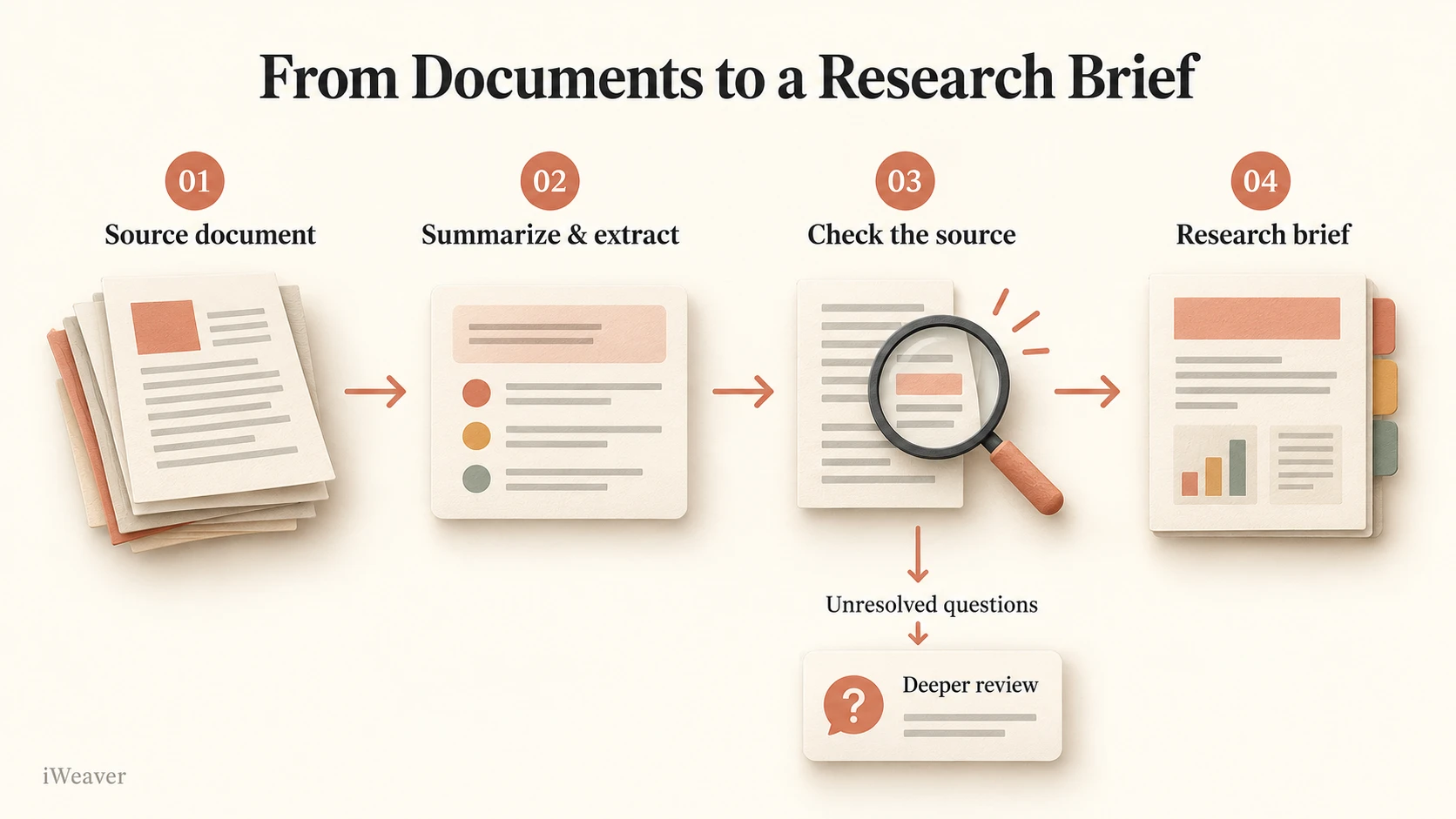
Consider a folder of research reports. The first job might be to identify each report’s subject, publication date, and main question. The next might be to extract stated findings into a consistent table. Only after that preparation do you ask which findings agree, where methods differ, and what remains unresolved. This is an editorial workflow suggestion, not a claim that we tested Haiku 5.5 on those reports.
| Task | A useful output | What to check |
|---|---|---|
| Sort incoming material | Topic labels with short reasons | Ambiguous documents and inconsistent labels |
| Prepare a first-pass summary | Main claims and supporting details | Missing qualifications and changed meaning |
| Extract comparable facts | A table with source locations | Units, dates, missing values, and attribution |
| Prepare a handoff | Findings, uncertainties, and open questions | Whether the next reviewer can trace the evidence |
A prompt for an evidence-focused first pass
Use this prompt with a document you can inspect alongside the answer. It asks for a structured reading aid and keeps unsupported interpretation separate from extraction.
Read the supplied document and prepare a research brief.

Use these sections:
1. Main question: what problem does the document address?
2. Key findings: identify up to five findings stated in the source.
3. Supporting evidence: give the section or page for each finding
   when that information is available in the supplied material.
4. Limitations: preserve the author's qualifications and caveats.
5. Open questions: list issues the document does not resolve.

Use only the supplied material. If a detail or source location is
unavailable, say so. Separate your interpretation from source claims.
Do not invent quotations, statistics, or page numbers.
After receiving the brief, check a few findings against the original. If a statement combines details from different sections, ask the model to separate them and identify the supporting passages. A polished summary becomes useful only when it preserves the distinctions you need for your work.
How much effort should you use?
Anthropic’s prompting guidance recommends starting with medium, the default on the Claude API and in Claude Code. It describes high as suitable for knowledge work and longer tasks, while higher levels should earn their extra cost through evaluation. The guidance also notes that longer thinking can affect response length and token consumption. For a document workflow, keep the source and prompt fixed while comparing settings your interface supports. Evaluate whether the answer preserves caveats, follows the format, and identifies missing information. Choose the setting that produces an acceptable result with a reasonable amount of review; a longer response alone does not establish better quality.
When Sonnet or Opus may be the better choice
Anthropic continues to recommend Sonnet 5.5 and Opus 5.5 for complex agentic coding work. Haiku’s intended role includes smaller, well-defined assignments that can support a larger workflow. The release therefore gives users another routing option rather than establishing one model as the right choice for every task.
For research work, the decision should depend on your own examples. A model that extracts fields well may still struggle to explain conflicting evidence. If the task requires sustained interpretation across several sources, compare a larger model on the same material and judge the resulting work, including the time needed to correct it. Our Claude Sonnet 5.5 overview provides background on another model in the family.
Turn model output into a reusable workflow
Choosing a model is one part of knowledge work. You also need to keep source material accessible, review the interpretation, and organize useful results for the next task. iWeaver’s document workflows include summaries, explanations, and structured insights; its PDF Explainer can help you work through difficult sections of a PDF and ask for clearer explanations or examples.
Claude Haiku 5.5 is now available in iWeaver, and iWeaver provides a free trial of the model. Start with a document brief, an extraction task, or a focused question about your source material. Review the answer against the original before turning it into notes or a report.
For your first Haiku 5.5 evaluation, choose a small, repeatable task: one document brief, one extraction table, or one classification pass. Define what an acceptable answer must include, check it against the source, and record how much revision it needs. That gives you a more useful basis for adopting the model than a headline price or a broad benchmark alone.