AI summary generators have moved far beyond shortening a paragraph. The better tools in 2026 can work with PDFs, websites, videos, audio, screenshots, research papers, and multiple sources at once.
That also makes choosing one more difficult. A tool that is excellent for a short article may be inconvenient for a 200-page PDF, while a meeting summarizer may not be the right choice for research.
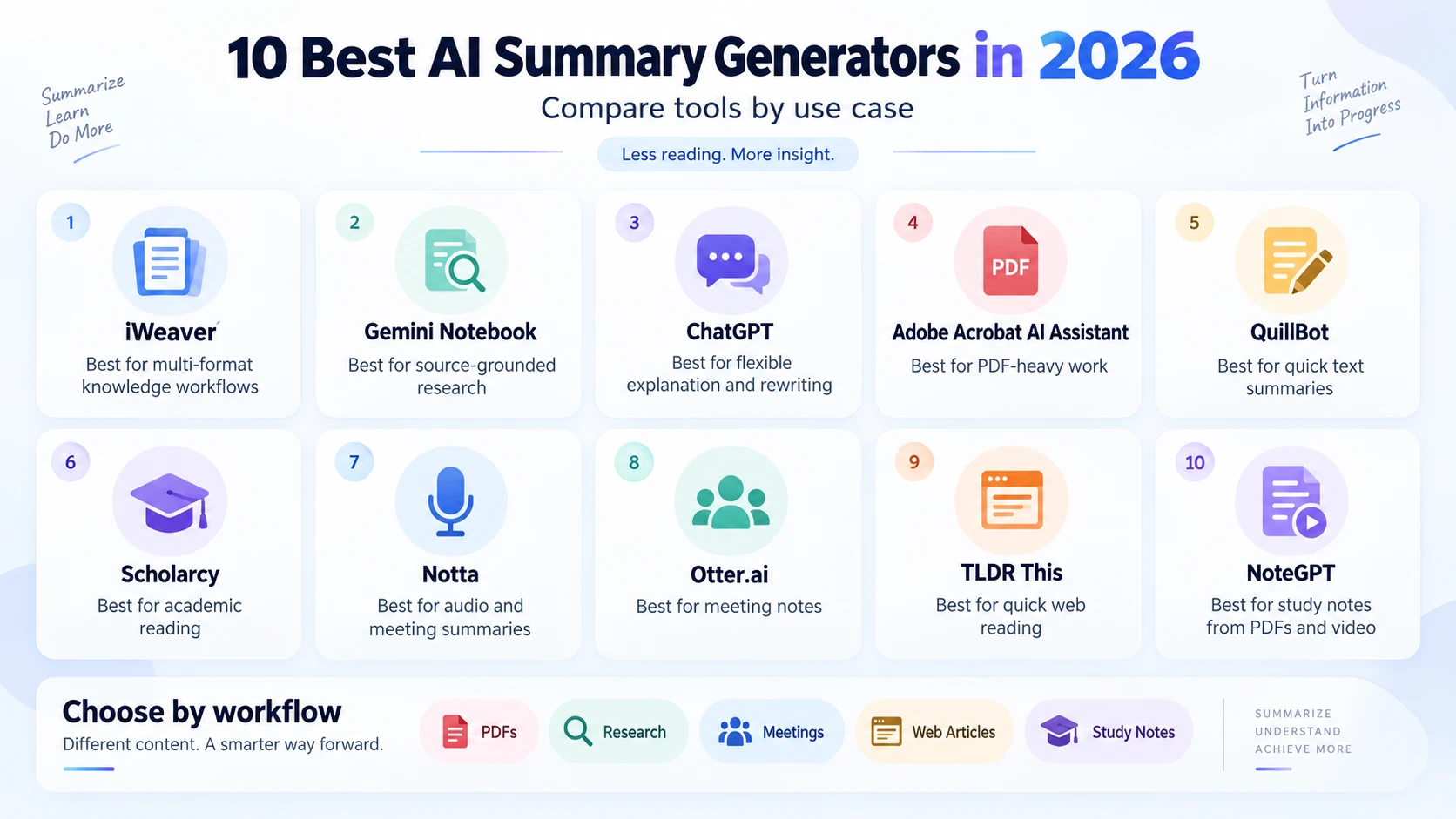
Quick Comparison
| Tool | Best for | Strong input types | Main consideration |
|---|---|---|---|
| iWeaver | Multi-format knowledge workflows | PDF, docs, text, links, video, audio, images | Best value comes from using several formats together |
| Gemini Notebook | Source-grounded research | PDFs, Docs, web pages, YouTube, audio | Designed around notebooks and source collections |
| ChatGPT | Flexible explanation and rewriting | Text, files, images | Output quality depends heavily on the prompt and source |
| Adobe Acrobat AI Assistant | PDF-heavy work | PDFs and document collections | Most useful if your workflow already lives in Acrobat |
| QuillBot | Quick text summaries | Pasted text and documents | Better for straightforward summarization than deep research |
| Scholarcy | Academic reading | Papers, articles, reports | More specialized than a general assistant |
| Notta | Audio and meeting summaries | Audio, video, meetings | Focused mainly on spoken content |
| Otter.ai | Meeting notes | Live and recorded meetings | Less suited to PDFs and general documents |
| TLDR This | Fast article summaries | Web articles and text | Limited for complex multi-source analysis |
| NoteGPT | Study and content notes | PDFs, YouTube, text | Feature depth varies by content type |
1. iWeaver — Best for Multi-Format Summaries
iWeaver is useful when your source material is spread across formats rather than contained in one document. Its AI Summarizer can work with text, documents, links, video, and audio, making it practical for research, study, content review, and knowledge management.
Instead of producing only a short paragraph, it can turn source material into structured notes, outlines, transcripts, key points, and other formats. That makes it especially useful when the summary is the first step in a larger workflow.
For example, you can summarize several reports, compare the important points, then continue asking questions about the material.
Good fit for: researchers, analysts, students, content teams, and users working across several file types.
2. Gemini Notebook — Best for Source-Grounded Research
Google's notebook-based research experience is built around a collection of sources. You can add documents, websites, YouTube videos, and other supported material, then ask questions grounded in those sources.
Its strengths are not limited to a standard summary. It can also create study-style outputs, audio overviews, and visual structures such as mind maps.
This works well when you are researching one topic from many sources and want to stay close to the material you uploaded.
Good fit for: research projects, course material, background reading, and source-based synthesis.
3. ChatGPT — Best for Flexible Follow-Up
ChatGPT is strong when you want to control how a summary is written. After uploading a supported file or image, you can ask for a short summary, detailed explanation, comparison, table, study notes, or a version written for a specific audience.
Its biggest advantage is conversational iteration. You can move from “summarize this” to “explain section three,” “compare these arguments,” or “turn the findings into an action plan.”
The trade-off is that good prompts and source checking still matter. For important work, verify details against the original material.
Good fit for: general knowledge work, explanation, drafting, and follow-up questions.
4. Adobe Acrobat AI Assistant — Best for PDF-Centered Work
If most of your work happens inside PDFs, Adobe Acrobat AI Assistant is a natural option. It can generate document summaries, answer questions, and help users navigate long reports.
Adobe's document environment is particularly useful when page context and document navigation matter. It also supports workflows involving collections of PDFs.
For someone who reads contracts, reports, manuals, or long business documents every day, keeping the summarization layer inside the PDF tool can reduce switching between apps.
Good fit for: business documents, long PDFs, reports, and existing Acrobat users.
5. QuillBot — Best for Fast Text Summaries
QuillBot's summarizer is straightforward: add text or a document and choose a concise summary style. It is useful when you do not need a research workspace or complex multi-file reasoning.
Paragraph and bullet-style outputs make it easy to shorten articles, essays, notes, or drafts quickly.
Its simplicity is the main advantage. If your task is just “make this shorter without changing the main point,” it may be faster than opening a more complex knowledge tool.
Good fit for: essays, articles, notes, and short documents.
6. Scholarcy — Best for Academic Papers
Scholarcy is designed around academic and professional reading. It can break papers and reports into digestible sections and highlight important information.
That makes it useful for literature reviews and early-stage paper screening, where the goal is often to understand the research question, method, findings, and limitations before deciding what to read in full.
No summary should replace the original paper when you need to cite evidence, but Scholarcy can reduce the time spent deciding which sources deserve deeper reading.
Good fit for: researchers, graduate students, and literature reviews.
7. Notta — Best for Audio and Recorded Content
Notta focuses on transcription and spoken-content workflows. It is useful for turning meetings, interviews, lectures, and recordings into searchable text and summaries.
For users who spend more time listening than reading, this can be more useful than a document-first summarizer.
Look for speaker separation, transcription quality, supported languages, and export options when comparing audio summarizers.
Good fit for: interviews, lectures, podcasts, and recorded meetings.
8. Otter.ai — Best for Meeting Summaries
Otter.ai is centered on meetings. It can capture conversations, produce transcripts, and surface notes or action items.
Its value is highest when summarization needs to happen as part of a recurring meeting workflow rather than as an occasional document task.
Teams should still review automated action items before treating them as final, especially when a discussion contains ambiguous decisions.
Good fit for: recurring meetings, team notes, and conversation records.
9. TLDR This — Best for Quick Web Reading
TLDR This is aimed at users who want the main point of an article without building a larger research workspace.
It is useful for quick triage: summarize a page, decide whether it deserves a full read, and move on.
For complex reports, academic material, or multiple-source synthesis, a tool with stronger document and follow-up capabilities will usually be more appropriate.
Good fit for: news articles, blog posts, and quick reading.
10. NoteGPT — Best for Study Notes from Mixed Content
NoteGPT combines summarization with study-oriented formats and supports common content types such as PDFs and YouTube videos.
It can be convenient for students who want to turn a lecture, video, or document into notes without creating the structure manually.
As with any study summarizer, use the generated notes as a guide rather than as a substitute for checking definitions, formulas, quotations, and source evidence.
Good fit for: lectures, study materials, and video notes.
How to Choose an AI Summary Generator
Start with your source type.
If you mainly work with long PDFs, choose a tool built for document navigation. If your information is spread across PDFs, links, videos, and audio, a multi-format tool is more efficient. If your main problem is meetings, use a meeting-first product.
Then look at what happens after the summary.
Ask whether you need:
- Follow-up questions
- Citations or source references
- Multi-document comparison
- Audio transcription
- OCR for scanned PDFs
- Tables or structured notes
- Export to reusable formats
- A persistent research workspace
For scanned or image-heavy files, use a tool with OCR support such as an AI PDF Summarizer. For screenshots and visual notes, an AI Image Summarizer is a better match.
A Better Way to Prompt a Summarizer
Avoid asking only:
Summarize this.
Instead, tell the tool what matters.
Try:
Summarize this report in five sections: objective, main findings, supporting evidence, risks, and recommended actions. Keep important numbers and flag any claims that need verification.
For a research paper:
Summarize the research question, dataset, methodology, results, limitations, and what is genuinely new. Do not invent information that is not in the paper.
For a meeting:
Give me the decisions, unresolved questions, owners, deadlines, and follow-up actions. Separate confirmed decisions from suggestions.
Better prompts make it easier to judge whether the output is actually useful.
There is no single summary generator that fits every workflow. The best choice depends on what you need to summarize and what you want to do next.
Use multi-format tools for mixed research, document-first tools for PDFs, meeting tools for conversations, and academic tools for papers. Most importantly, treat summaries as a faster way into the source—not a replacement for checking the original when accuracy matters.