A 10-minute YouTube video is easy to watch. A 90-minute podcast, lecture, webinar, or technical tutorial is a different story. When you only need the main argument, key examples, or a few specific answers, watching every minute is not always the best use of your time. That is where an AI YouTube summarizer helps. Instead of simply shortening a transcript, newer tools can generate key points, timestamps, searchable transcripts, study notes, mind maps, and answers to follow-up questions.
But they are not all built for the same job. Some are designed for quickly deciding whether a video is worth watching. Others are better for studying, research, note-taking, or building a library from dozens of videos.
Here are seven YouTube summarizers worth considering in 2026.
Best YouTube Summarizers at a Glance
| Tool | Best for | Main strength | Keep in mind |
|---|---|---|---|
| iWeaver | Research, learning, and long videos | Summary, transcript, timestamps, mind maps, and follow-up work | More features than needed for a quick TL;DR |
| Eightify | Fast summaries while browsing YouTube | Quick insights and timestamp navigation | Primarily built around the YouTube viewing experience |
| NotebookLM | Research across videos and other sources | Source-grounded Q&A and multi-source analysis | YouTube import relies on available transcripts |
| NoteGPT | Students and batch video summarization | Summaries, transcripts, and multiple-video workflows | Interface includes many study features you may not need |
| Glasp | Browser-based learning and highlighting | Chrome extension with transcripts and customizable summaries | Best suited to users comfortable with extensions |
| Notta | Transcription and multilingual video notes | Combines transcription with summaries | Strongest when transcription is also important |
| ChatGPT | Custom summary formats | Flexible prompts and follow-up analysis | Usually works best when you provide the transcript or source content |
What Should a Good YouTube Summarizer Do?
Most tools can produce a few bullet points. That alone does not make them equally useful.
A good YouTube summarizer should help you answer three questions quickly:
What is this video about?
You should be able to understand the main idea without reading a transcript that is nearly as long as the video itself.
Where are the useful parts?
Timestamps or clear sections make it easier to return to an example, explanation, demonstration, or important claim.
What can I do with the information afterward?
For learning and research, a useful summary should become notes you can search, question, compare, or reorganize later.
When comparing tools, look at:
- Summary structure
- Transcript access
- Timestamps
- Follow-up questions
- Language support
- Long-video handling
- Multiple-video support
- Export options
- Support for other source types
- Ease of use
The best choice depends less on which tool has the longest feature list and more on what you plan to do after the summary is generated.
1. iWeaver — Best for Research and Multi-Format Learning
iWeaver is useful when a YouTube video is part of a larger research or learning workflow rather than something you simply want to skim once.
With its YouTube Video Summarizer, you can paste a video link and turn the content into a structured summary, searchable transcript, timestamped highlights, and visual mind map.
It also supports batch processing and local video uploads, making it useful when your research extends beyond a single YouTube link.
Best for
- Long lectures
- Webinars
- Interviews
- Podcasts
- Technical tutorials
- Research videos
- Multiple-video projects
Why it stands out
The main advantage is what happens after the initial summary.
Instead of treating the video as a one-time piece of content, you can turn it into structured material that is easier to review and use later.
For example, after summarizing a 60-minute industry webinar, you might want to:
- Extract five market trends
- Find every company mentioned
- Turn the content into an outline
- Identify claims worth checking
- Create a mind map
- Compare the ideas with another source
That makes iWeaver better suited to deeper workflows than tools built mainly to generate a short set of bullets.
Keep in mind
If your only goal is to get a five-line overview before deciding whether to watch a video, a lightweight browser extension may be faster.
2. Eightify — Best for Quick YouTube Summaries
Eightify is designed for people who spend a lot of time directly on YouTube and want a faster way to understand videos without leaving the page.
It focuses on quick key insights and timestamped navigation, so you can jump directly to relevant topics. It also provides video-to-text features, multilingual support, and shareable summaries.
Best for
- Quickly screening videos
- Podcasts
- Product reviews
- Interviews
- News and commentary
- Everyday YouTube browsing
Why it stands out
Eightify keeps the summarization experience close to YouTube.
That is helpful when your workflow looks like this:
- Open a video.
- Check the summary.
- Jump to one or two interesting sections.
- Decide whether the full video is worth watching.
You do not necessarily need a separate research workspace.
Keep in mind
If you want to combine YouTube findings with PDFs, reports, webpages, or other research material, a broader research tool may fit better.
3. NotebookLM — Best for Research Across Multiple Sources
NotebookLM approaches YouTube differently.
Rather than acting primarily as a quick video-summary tool, it treats a YouTube video as one source inside a larger notebook.
You can add public YouTube videos with captions alongside PDFs, webpages, documents, audio, and other material, then ask questions across those sources. Google notes that for YouTube URLs, NotebookLM imports the video's transcript rather than the visual content itself.
Its answers inside NotebookLM are grounded in the sources you add, which makes it particularly useful for research projects where you want to know where an answer came from.
Best for
- Research projects
- University study
- Literature and source reviews
- Comparing several videos
- Combining videos with documents
Example
Imagine you are researching AI agents.
You could add:
- Three conference talks
- Two YouTube interviews
- A PDF research report
- Several webpages
Then ask:
What are the three biggest disagreements between these sources about autonomous AI agents?
That is a different use case from simply asking for a summary of one video.
Keep in mind
NotebookLM's YouTube workflow depends on public videos with available captions, and the imported source is the transcript rather than the video's visuals.
If a tutorial relies heavily on diagrams, animations, or screen demonstrations, you may still need to watch the relevant sections.
4. NoteGPT — Best for Students and Multiple Videos
NoteGPT combines YouTube summarization with a broader set of study and note-taking features.
Paste a YouTube URL and it can generate a transcript and summary. It also supports processing multiple videos and playlists, which is useful when you have more than one lecture or tutorial to review.
Best for
- Students
- Online courses
- Lecture series
- Tutorials
- YouTube playlists
- Large study backlogs
Why it stands out
One video is rarely the problem for students.
The real problem is having:
- 12 recorded lectures
- 8 tutorial videos
- A playlist before an exam
- Several competing explanations of the same topic
A workflow that supports multiple videos can reduce the amount of repetitive copying and pasting.
NoteGPT is therefore more attractive when YouTube is being used as a learning library rather than casual entertainment.
Keep in mind
It includes a wide range of learning and AI features. If you only want a very basic summary, the interface may offer more functionality than necessary.
5. Glasp — Best for Browser-Based Learning
Glasp's YouTube Summary tool works particularly well for people who already consume most of their learning content in a browser.
Its browser extension can display YouTube transcripts and summaries alongside the video. Users can customize prompts, choose different AI models, generate timestamped summaries, and work in multiple languages.
Best for
- Researchers
- Students
- Frequent YouTube learners
- Highlighting and note collection
- Browser-heavy workflows
Why it stands out
Glasp makes summarization part of the browsing experience.
You can watch a video, review the transcript, generate a summary, and continue working with the information without repeatedly moving between different tools.
It is particularly useful if highlighting and collecting ideas is already part of the way you learn online.
Keep in mind
The workflow is closely tied to browser extensions. If you prefer a standalone web workspace or frequently work across multiple devices, another option may feel more natural.
6. Notta — Best for Transcription and Video Summaries
Notta is a stronger choice when you need both a transcript and a summary.
Its YouTube summarizer can generate a transcript alongside the video summary, while its Chrome extension can display summaries directly during YouTube viewing. Notta also emphasizes multilingual transcription and summarization.
Best for
- Interviews
- Lectures
- Webinars
- Podcasts
- Multilingual videos
- Users who need transcripts
Why it stands out
Sometimes the summary is not enough.
You may need the complete wording because you want to:
- Find a quote
- Search for a specific phrase
- Review a speaker's explanation
- Translate a section
- Turn the transcript into another document
In those situations, transcription quality and transcript access matter just as much as the generated summary.
Keep in mind
Notta's Chrome extension requires closed captions to be available for the YouTube video.
For videos where transcript availability is unreliable, check whether your chosen workflow can process the original audio instead.
7. ChatGPT — Best for Custom YouTube Summaries
ChatGPT is not primarily a dedicated YouTube summarizer, but it becomes useful once you have the video's transcript or relevant source content.
Its main advantage is flexibility.
Instead of accepting one predefined summary format, you can tell it exactly what information you want.
For example:
Summarize this transcript in five sections: main argument, supporting evidence, examples, practical advice, and points I should verify.
Or:
Turn this tutorial transcript into a step-by-step checklist. Remove introductions, sponsor messages, repetition, and unrelated discussion.
You can continue asking questions after the first summary.
Best for
- Custom summaries
- Content repurposing
- Detailed follow-up questions
- Extracting specific information
- Rewriting video content for another audience
Why it stands out
The summary can immediately become another output.
For example:
Video transcript → summary → outline → LinkedIn post → presentation notes
That makes ChatGPT particularly useful when understanding the video is only the first step.
Keep in mind
It is not always a direct paste-a-YouTube-link workflow.
For predictable results, first obtain the video's text using YouTube's transcript or a dedicated YouTube Transcript Generator, then provide that content with a clear instruction.
Which YouTube Summarizer Should You Choose?
The easiest way to choose is to start with your actual use case.
| Your goal | Tool to consider |
|---|---|
| Summarize videos and continue researching the content | iWeaver |
| Get quick insights directly while browsing YouTube | Eightify |
| Combine YouTube with PDFs and other research sources | NotebookLM |
| Process lectures, playlists, or several videos | NoteGPT |
| Summarize and highlight while browsing | Glasp |
| Get both transcripts and summaries | Notta |
| Create highly customized summaries from transcripts | ChatGPT |
Do not choose based only on the shortest summary.
A five-bullet summary may be perfect for deciding whether to watch a podcast, but it may be useless when preparing for an exam or researching an industry.
Start with the output you eventually need.
How to Summarize a YouTube Video With AI
Most dedicated YouTube summarizers use a similar workflow.
Step 1: Copy the YouTube URL
Open the video you want to summarize and copy its link.
Long-form content usually benefits most from summarization, including:
- Lectures
- Podcasts
- Webinars
- Interviews
- Tutorials
- Conference talks
- Product reviews
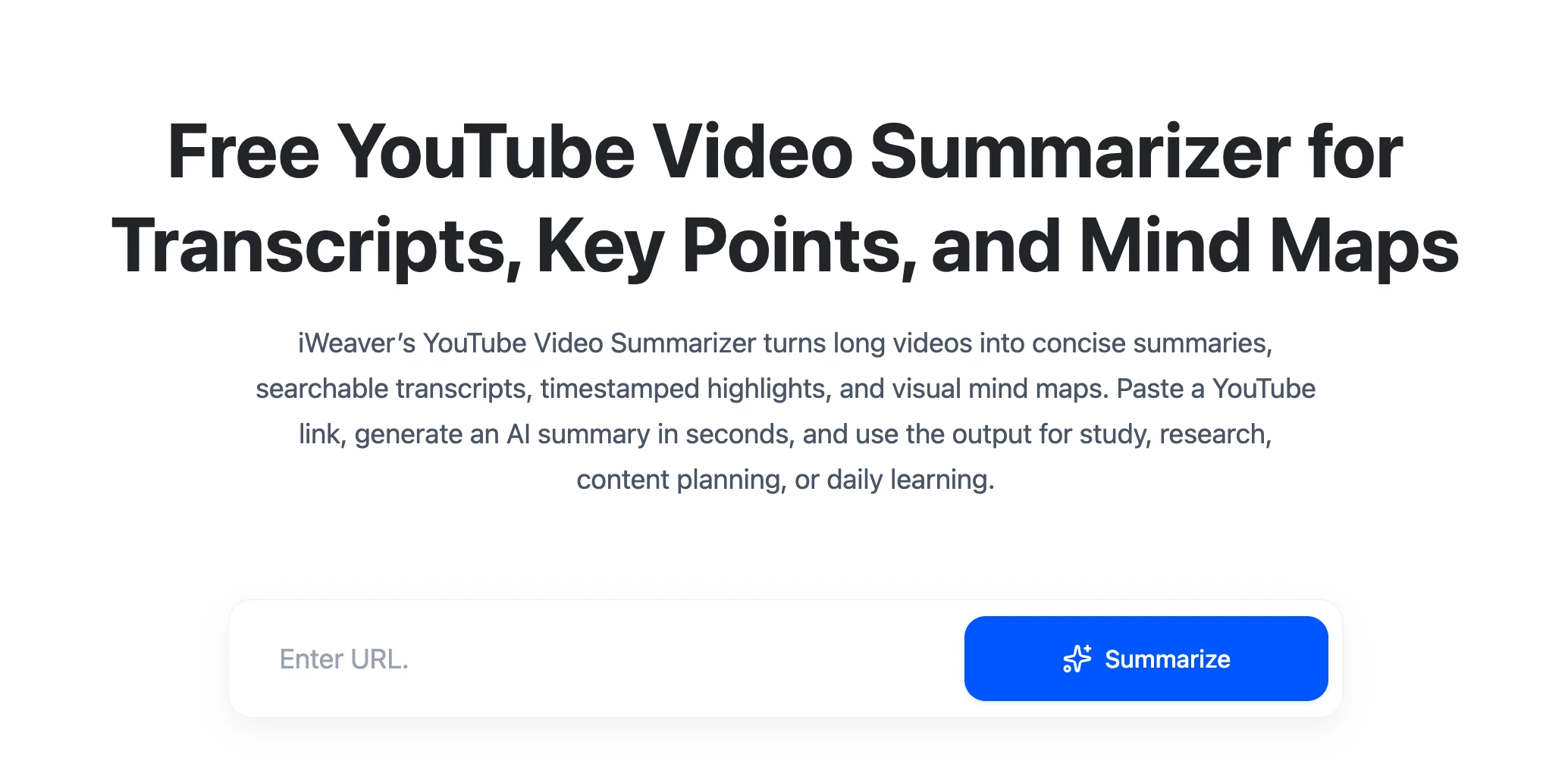
Step 2: Paste the Link Into a YouTube Summarizer
Paste the URL into iWeaver.
Step 3: Generate the First Summary
Start with a general overview.
You want to understand:
- The main topic
- The speaker's central argument
- Major supporting points
- Important conclusions
Do not stop here if the video is important. The first summary is best treated as a map of the content.
Step 4: Ask More Specific Questions
Now narrow the task.
For a tutorial:
Turn the video into a numbered process. Include required tools, important settings, and common mistakes.
For an interview:
List the five strongest claims made by the guest and summarize the evidence given for each one.
For a lecture:
Create study notes with key concepts, definitions, examples, and five review questions.
For a product review:
Extract the pros, cons, specifications mentioned, and the reviewer's final recommendation.
Specific questions usually produce more useful results than repeatedly asking for a “better summary.”
How to Get Better YouTube Summaries
The quality of a summary depends partly on what you ask for.
Instead of:
Summarize this video.
Try something closer to the actual job.
For a lecture
Create study notes from this lecture. Include the main concepts, definitions, examples, and relationships between ideas. Finish with five questions I should be able to answer.
For a podcast
Summarize the major topics discussed. Separate the host's views from the guest's views and highlight any points where they disagree.
For a tutorial
Turn this video into a step-by-step guide. Remove introductions and unrelated discussion. Keep warnings, requirements, and troubleshooting advice.
For market research
Extract every company, product, trend, statistic, and prediction mentioned. Organize them in a table and distinguish facts from the speaker's opinions.
For a product review
Summarize the product's strengths, weaknesses, intended users, alternatives mentioned, and situations where the reviewer would not recommend it.
A good prompt tells the AI what information matters and how you intend to use it.
YouTube Summary vs. Transcript: Which Do You Need?
A transcript and a summary solve different problems.
A transcript preserves what was said.
A summary reduces it to what appears most important.
Use a summary when you want to:
- Understand the video quickly
- Decide whether to watch it
- Review the main ideas
- Create short notes
Use a transcript when you want to:
- Find exact wording
- Search for a particular topic
- Check whether the summary missed something
- Locate quotes
- Create your own detailed notes
For important videos, the most useful workflow often combines both.
Read the summary first, then search the transcript when you need more detail.
Can AI Summarize a YouTube Video Without Captions?
Sometimes, but it depends on the tool.
Many YouTube summarizers start with the video's existing transcript or captions. If the video has no usable transcript, those tools may not be able to process it normally.
Other tools can transcribe audio themselves before creating the summary.
This is worth checking if you regularly work with:
- Older videos
- Podcasts uploaded to YouTube
- Small channels
- Recorded events
- Videos in less common languages
If a tool cannot access the spoken content reliably, even a sophisticated language model cannot produce an accurate summary.
Can You Summarize Multiple YouTube Videos at Once?
Some tools support batch processing or multi-source research.
This becomes especially useful when your real question is not:
What does this video say?
but:
What do these 10 videos say about the same topic?
For example, you could compare several product reviews and ask for:
- Common advantages
- Recurring complaints
- Features reviewers disagree about
- Different recommendations by user type
Researchers can do the same with conference talks, interviews, or educational videos.
If this is your main workflow, multi-video support is more important than generating the fastest individual summary.
For a broader comparison of tools that also work with PDFs, articles, meetings, and reports, see our guide to the best AI summarizer tools.
When Should You Still Watch the Full Video?
A summary is not always a replacement for the original.
You should consider returning to the video when:
- Visual demonstrations are essential
- Tone or emotion changes the meaning
- You need exact quotes
- The topic is controversial or high stakes
- The summary makes a surprising claim
- You need to understand how something was demonstrated
- Important details depend on charts or visuals
This is particularly important for coding demonstrations, design tutorials, product tests, experiments, and visual explanations.
Think of an AI summary as a navigation layer.
It helps you decide what deserves your attention and where to look next.
FAQ
What is a YouTube summarizer?
A YouTube summarizer is an AI tool that converts a YouTube video's spoken content or transcript into a shorter overview. Depending on the tool, it may also provide timestamps, transcripts, notes, mind maps, or follow-up Q&A.
What is the best AI YouTube summarizer?
There is no single best option for every workflow. iWeaver is useful for deeper research and structured notes, Eightify for quick on-page summaries, NotebookLM for multi-source research, NoteGPT for study workflows, Glasp for browser-based learning, and Notta for transcription-heavy tasks.
Is there a free YouTube summarizer?
Yes. Several YouTube summarizers offer free access or limited free usage. Limits can change, so check the current plan before choosing a tool based primarily on price.
Can AI summarize a two-hour YouTube video?
Many tools can process long-form videos, but support varies based on transcript length, captions, account limits, and the tool's processing method. For very long videos, section-by-section summaries can be easier to verify and use.
Can ChatGPT summarize YouTube videos?
ChatGPT can summarize video transcripts and other text you provide. For consistent results, extract the transcript first and ask ChatGPT to summarize it according to your specific goal.
Can AI summarize YouTube Shorts?
Yes, provided the tool can access enough spoken or transcript content. However, summarization is generally more useful for long videos where watching the full source requires a significant time investment.
Are YouTube AI summaries accurate?
They can be useful, but they are not guaranteed to preserve every detail correctly. Problems in captions or transcripts can also carry into the final summary. Check important claims against the original video.
Can I use a YouTube summary for studying?
Yes, but do more than read the summary once. Turn it into questions, flashcards, outlines, or notes, then return to the original video when a concept needs more explanation.
Can a YouTube summarizer understand visual content?
It depends on the product. Many tools primarily work from captions or transcripts rather than analyzing every visual frame. This means charts, demonstrations, slides, or visual jokes may not be fully represented in the summary.
Final Thoughts
The best YouTube summarizer is not necessarily the one that produces the shortest answer.
For casual browsing, a quick set of key points may be all you need.
For studying, transcripts, timestamps, structured notes, and review questions become more valuable.
For research, the ability to compare several videos and connect them with documents or other sources matters even more.
A useful workflow is simple:
Summarize first. Decide what matters. Then go deeper only where necessary.
That way, AI does not replace the useful parts of watching a video. It helps you spend your viewing time on the parts that actually deserve it.